
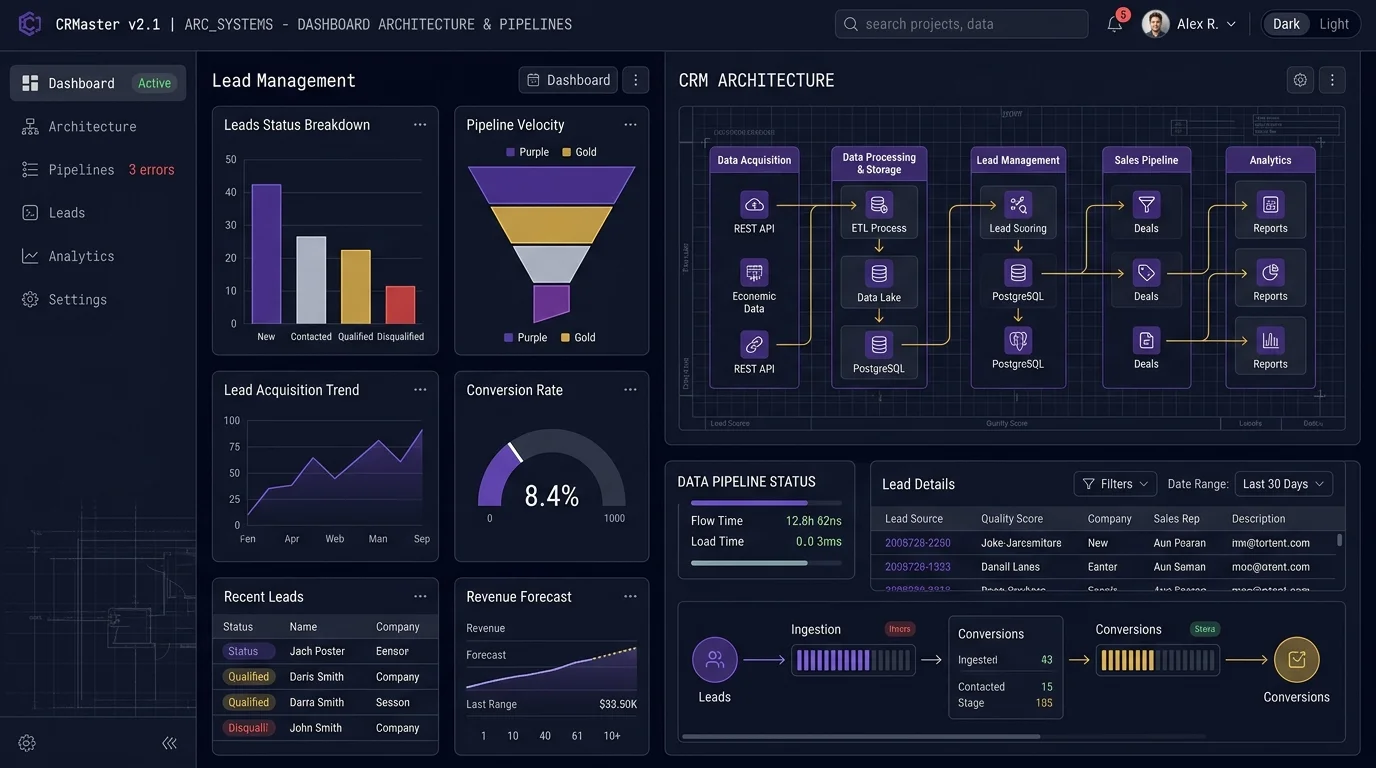
📑 Jump to Section (Table of Contents)
Introduction
Growing organizations frequently abandon spreadsheets and generic Customer Relationship Management (CRM) platforms when record volumes increase beyond 10,000 entities. Spreadsheets cause synchronization errors across sales teams, while commercial platforms impose rigid data structures that contradict internal operations. A company's software must reflect actual sales, marketing, customer service, and operational procedures rather than forcing staff into predefined vendor configurations.
Organizations address software friction through two specific methods: customize an existing commercial platform or build a dedicated system from scratch. Choosing CRM Development Services enables leadership to evaluate these alternatives accurately. Learning how to build a custom CRM involves a structured engineering lifecycle covering planning, functional feature mapping, system architecture, database modeling, external tool integrations, event-driven automation, security access policies, quality assurance testing, deployment schedules, cost estimation, and long-term maintenance.
Building a custom CRM is the technical process of designing a business process architecture, implementing a scalable relational database model, and connecting bi-directional API and webhook automations to deliver tailored operational workflows. Custom CRM solutions provide 3 main business benefits: complete ownership of proprietary company data, elimination of per-seat monthly license fees, and exact alignment with complex sales cycles. Enterprise operations deploy bespoke platforms across 4 primary operational areas, including multi-tier lead distribution, real-time inventory allocation, automated billing reconciliation, and regulatory audit compliance. The core technical structure consists of 5 modular components: an authentication layer, a relational data storage engine, a RESTful Application Programming Interface (API) gateway, an event webhook emitter, and a role-based responsive client user interface.
What Is a Custom CRM?
A custom CRM is an independently developed or deeply modified customer relationship management software system built to support a company's specific operating processes, database fields, user permission hierarchies, and reporting requirements. Generic off-the-shelf platforms such as Salesforce, HubSpot, Zoho CRM, Pipedrive, and Microsoft Dynamics 365 provide generalized schemas intended for broad commercial appeal. Commercial platforms including SugarCRM, Freshsales, Insightly, Nimble, Less Annoying CRM, Apptivo, and Vtiger offer general capabilities, but lack native accommodation for non-standard proprietary operations. A custom CRM contains proprietary tables, customized calculations, and native connections to internal applications without external functional constraints.
What is CRM customization?
CRM customization is the technical process of modifying an existing CRM platform's native features to align with specific business operations. Rather than rewriting the baseline software codebase, developers modify 10 specific structural areas within the platform:
- Fields: Creating dedicated numerical, text, picklist, and formula properties.
- Objects: Building custom database entities to track assets, contracts, or partner transactions.
- Dashboards: Constructing role-based visual metrics for executive oversight.
- User roles: Defining granular permission hierarchies to restrict record visibility.
- Workflows: Setting up conditional logic triggers across operational tasks.
- Automations: Deploying background script jobs to update statuses without human input.
- Reports: Generating scheduled data exports for cross-departmental analysis.
- Integrations: Connecting third-party web services through secure REST endpoints.
- User interface: Reordering screen layouts, sidebars, and navigation bars to improve data entry speed.
- Data structure: Establishing relational links between parents, children, and junction tables.
What is customization in CRM?
Customization in CRM refers to code-level and schema-level adjustments made to expand platform functionality beyond native platform boundaries. Technical leaders distinguish between 3 progressive implementation levels:
- Configuration: Changing existing settings within the administrative interface using toggle switches, default dropdown options, and standard profile options without writing code.
- Customization: Modifying an existing platform through custom scripts, third-party extensions, customized database objects, and tailored layout engines to satisfy unique operational criteria.
- Custom CRM development: Engineering completely new software systems from the ground up, involving dedicated database schemas, backend application code, custom API gateways, and specialized frontend interfaces.
Custom CRM vs customized CRM
Selecting between modifying a commercial platform and building an independent system requires comparing key operational factors. The following table contrasts both approaches:
| Factor | Customized CRM | Custom-Built CRM |
|---|---|---|
| Starting point | Existing commercial platform (e.g., Salesforce, HubSpot, Zoho CRM) | Built from scratch with custom source code |
| Development time | Lower (4 to 10 weeks) | Higher (14 to 28 weeks) |
| Flexibility | Moderate to high (constrained by vendor APIs and object limits) | Very high (unlimited technical control over architecture) |
| Cost | Lower upfront development cost; higher recurring seat licenses | Higher upfront development cost; zero recurring seat software fees |
| Maintenance | Shared between vendor platform and internal administrator | Managed entirely by internal engineering team or agency partner |
| Control | Limited by vendor platform roadmap and API rate limits | Complete control over code, database storage, and security |
Why Build a Custom CRM for Your Business?
Businesses build custom CRMs when standard commercial tools restrict growth and create operational friction across departments. Five primary business requirements justify the investment in custom CRM development.
Your existing CRM doesn't fit your workflow
Commercial packages require companies to restructure sales stages around generic pipeline stages. Modify your software to fit company steps rather than changing working sales methods to fit software limits. When account executives must update 15 non-applicable fields to progress a deal, user adoption drops below 50%. A bespoke system displays only the exact fields and approval stages required for your specific operational model.
You need industry-specific functionality
Generic platforms fail to accommodate specialized data relationships required by specialized verticals. Consider these 7 industry-specific requirements:
- Real estate: Managing multi-unit listings, property parcel numbers, escrow milestones, and automated tenant matching.
- Healthcare: Maintaining strict Health Insurance Portability and Accountability Act (HIPAA) compliance, patient intake records, and Electronic Health Record (EHR) synchronization.
- Financial services: Handling portfolio tracking, Know Your Customer (KYC) verification, and multi-currency regulatory audits.
- SaaS: Tracking product usage analytics, seat provisioning, monthly recurring revenue (MRR), and automated renewal flags.
- E-commerce: Synchronizing order histories, inventory stock levels, shopping cart abandonments, and lifetime customer values.
- Professional services: Recording billable hours, project milestones, retainer balances, and resource utilization.
- Logistics: Monitoring fleet locations, freight billings, customs clearance stages, and warehouse delivery receipts.
You need advanced automation
Commercial CRMs restrict automation triggers using subscription tiers and execution quotas. Custom automation rules execute unlimited complex background procedures, including:
- Assign incoming leads to sales representatives based on territory, deal size, and rep capacity.
- Update pipeline stages automatically when digital signatures are verified on legal contracts.
- Send multi-channel notifications across Slack, email, and Short Message Service (SMS).
- Trigger automated onboarding email sequences upon payment confirmation.
- Create fulfillment tasks for operations teams when deals reach the closing stage.
- Score prospective leads continuously using demographic and behavioral activity signals.
- Escalate customer support issues when ticket resolution thresholds exceed Service Level Agreements (SLAs).
- Update records across all related accounting, inventory, and marketing databases simultaneously.
You need integrations with proprietary systems
Established businesses operate internal proprietary databases that lack pre-built commercial marketplace connectors. A custom CRM interfaces directly with 7 critical enterprise platforms:
- Enterprise Resource Planning (ERP): SAP, Oracle NetSuite, or internal manufacturing databases.
- Accounting software: QuickBooks, Xero, or custom automated invoicing ledgers.
- Corporate websites: Next.js portals, WordPress lead capture engines, and custom web applications.
- Payment gateways: Stripe, PayPal, Authorize.Net, and automated billing processors.
- Email marketing platforms: Mailchimp, Klaviyo, ActiveCampaign, or private SendGrid instances.
- Customer support software: Zendesk, Freshdesk, or internal ticketing modules.
- Communication platforms: Twilio telephony systems, Slack, Microsoft Teams, and WhatsApp Business APIs.
You need greater control over data
Third-party SaaS vendors store company records on shared multi-tenant infrastructure. Developing an internal CRM gives organizations complete governance over 5 crucial data areas:
- Data ownership: Eliminate vendor lock-in and retain unconstrained database access without export limitations.
- Access permissions: Establish field-level access control based on user clearance.
- Data structure: Modify SQL and NoSQL tables on demand to match changing product lines.
- Reporting: Execute complex analytical queries across millions of rows without platform timeout errors.
- Security requirements: Comply with General Data Protection Regulation (GDPR), SOC 2 Type II, and ISO 27001 data residency regulations.
Do Startups Need a Custom CRM Solution?
No, early-stage startups with standard pipelines and small teams do not need a custom CRM solution. Startups must evaluate commercial software against custom development based on operational maturity, available capital, and business model uniqueness.
When startups should use an off-the-shelf CRM
Startups must deploy off-the-shelf platforms like HubSpot, Pipedrive, Freshsales, or Less Annoying CRM under 6 specific circumstances:
- Operating as an early-stage company with unproven market validation.
- Managing a limited initial engineering budget under $25,000.
- Executing a simple sales process with 3 to 5 linear pipeline stages.
- Operating a small team of 1 to 5 sales representatives.
- Requiring standard contact storage, task reminders, and email logging.
- Needing to launch operations within 48 hours without engineering delays.
When startups should consider custom CRM development
Startups should transition to custom CRM engineering when encountering 6 operational triggers:
- Running highly specialized workflows that commercial software cannot represent.
- Requiring complex multi-step automations across external algorithmic services.
- Deploying a unique business model involving automated usage-based micro-billing.
- Managing proprietary customer data subject to strict intellectual property mandates.
- Connecting multiple disparate internal systems through continuous bi-directional synchronization.
- Experiencing operational bottlenecks that reduce sales conversion velocities.
Custom CRM vs off-the-shelf CRM for startups
Startups evaluating software investment should evaluate these 8 operational trade-offs:
| Evaluation Metric | Off-the-Shelf CRM for Startups | Custom CRM for Startups |
|---|---|---|
| Cost | $25 to $150 per user monthly; increases rapidly with team growth | $25,000+ upfront engineering; minimal monthly hosting overhead |
| Time to deployment | 1 to 3 days for initial setup | 10 to 14 weeks for a Minimum Viable Product (MVP) |
| Scalability | Dependent on subscription tiers and vendor API limits | Engineered specifically to scale with company data loads |
| Customization | Restricted to native configuration menus and app marketplace plugins | Unrestricted modification of interfaces, logic, and schemas |
| Integrations | Standard pre-built connectors; requires Zapier for custom apps | Direct native database and REST/GraphQL API connections |
| Maintenance | Zero infrastructure maintenance; handled by vendor | Requires dedicated developer hours for updates and patches |
| Ownership | Vendor owns the application code and controls data access policies | The startup owns 100% of the software intellectual property and database |
| User adoption | Moderate; sales reps struggle with non-applicable feature bloat | High; built directly around actual daily team workflows |
How to Build a Custom CRM: Step-by-Step
Building a custom CRM requires an organized development framework to ensure on-time delivery and high user adoption. Follow these 15 steps to design, engineer, and deploy an enterprise CRM platform.
Step 1: Define Your CRM Goals and Business Requirements
Define precise operational objectives before writing source code. Technical architects must identify 7 fundamental scoping parameters:
- Problems to solve: Identify data silos, slow response times, and unrecorded lead interactions.
- Target users: Document exact user counts across sales, marketing, support, and executive management.
- Departmental access: Determine which functional groups require read, write, or administrative rights.
- Automation opportunities: List repetitive manual tasks performed daily by account managers.
- External systems: Catalogue all databases, gateways, and communication channels requiring integration.
- Reporting metrics: Specify required Key Performance Indicators (KPIs), conversion funnels, and executive summaries.
- Storage requirements: Estimate annual data volume growth in gigabytes (GB) and terabytes (TB).
CRM Requirements Architecture Checklist
Step 2: Map Your Existing Business Processes
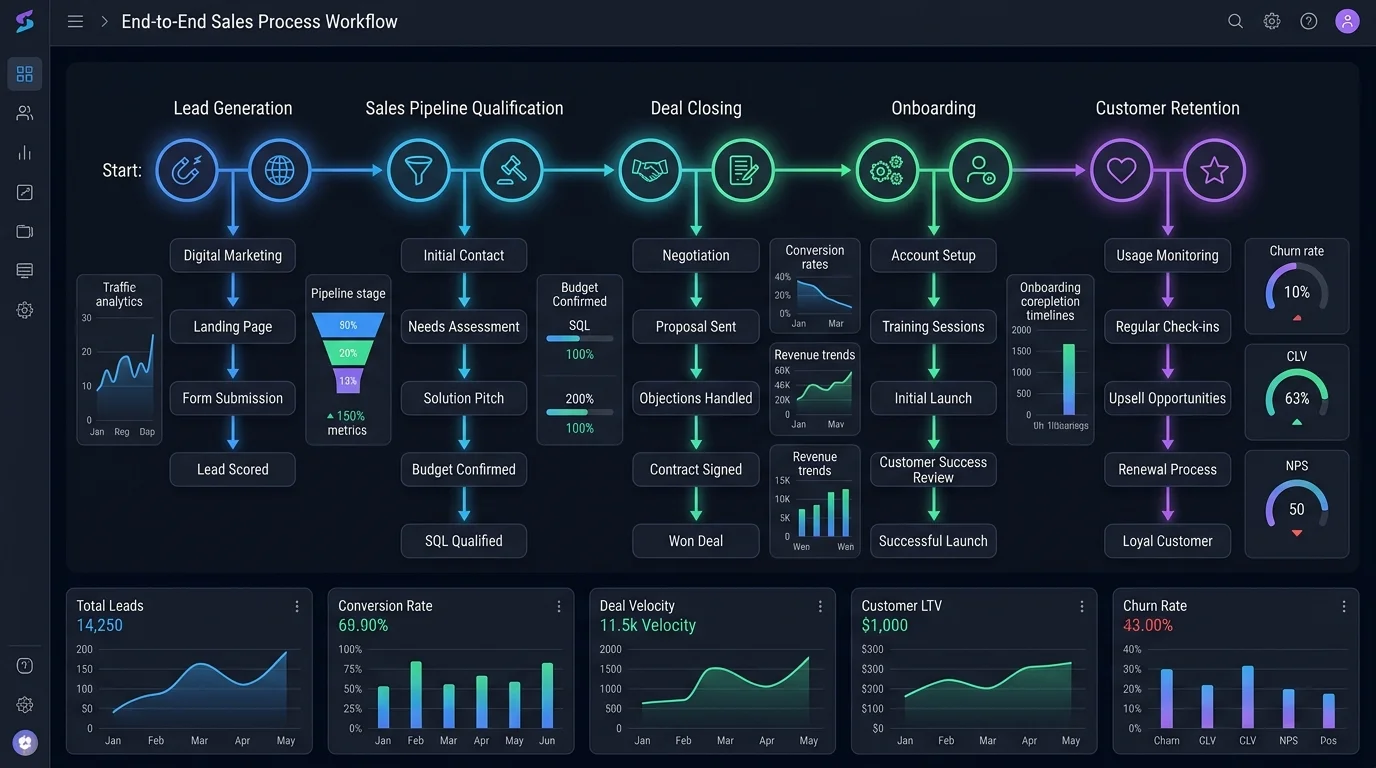
To customize CRM to fit business processes best practices, document every operational handoff across the customer lifecycle. Map the 8 core operational stages in sequence: Lead generation → Lead qualification → Sales discovery → Proposal presentation → Deal negotiation → Customer onboarding → Customer support → Retention renewal.
Document 6 specific attributes for every individual process stage:
- Trigger: The exact event initiating the step (e.g., website contact form submission).
- Responsible user: The employee role accountable for executing the task (e.g., Sales Development Representative).
- Required data: The mandatory inputs needed to proceed (e.g., business email, company size, annual budget).
- Action: The physical or digital task performed (e.g., conduct 15-minute qualification phone call).
- Automation: The background operation executed by code (e.g., compute lead score and notify account executive).
- Output: The verified deliverable produced (e.g., Qualified Opportunity record created in database).
Best practices for customizing CRM to fit business processes
Apply these 8 engineering best practices when structuring business process logic:
- Do not force inefficient legacy paper workflows into the digital CRM architecture.
- Remove redundant manual approval steps before writing automation scripts.
- Automate repetitive data collection actions to reduce employee friction.
- Keep data entry forms simple with fewer than 7 required fields per stage.
- Standardize pipeline stages with clear entry and exit qualification criteria.
- Define explicit record ownership to prevent unassigned customer inquiries.
- Document workflows in visual engineering flowcharts before software development.
- Design system navigation around actual daily user behavior rather than administrative assumptions.
Step 3: Decide Between Customizing an Existing CRM and Building From Scratch
Choosing between platform customization and bespoke ground-up engineering determines development timelines, infrastructure budgets, and project risks.
Choose CRM customization when...
Customize an existing CRM platform if your operational workflows align with standard sales pipelines, your engineering budget is under $40,000, and your team needs to launch within 6 to 8 weeks. Customizing platforms like Salesforce, HubSpot, or Zoho CRM delivers fast deployment while enabling custom fields, visual dashboards, and custom object additions.
Choose custom CRM development when...
Build a custom CRM from scratch if your business operates non-standard customer lifecycles, maintains over 150 employees where per-seat software fees become uneconomical, requires full control over data security, or depends on direct database integrations with internal systems.
Consider a hybrid approach
Deploy a hybrid architectural model if standard sales modules meet baseline needs, but proprietary operational components require dedicated software engineering. In this structure, a commercial CRM manages front-end lead capture while custom cloud microservices handle complex billing calculations, external data transformations, and proprietary operational workflows via secure REST APIs.
Step 4: Define the Core Features of Your Custom CRM
Organize custom CRM features by business department to prevent feature bloat and ensure high daily adoption across all organizational teams.
Contact and customer management
The contact management module serves as the primary operational hub. Essential features include 360-degree customer profile views, multiple communication phone and email records, complete interaction timelines, timestamped meeting notes, uploaded PDF contracts, and unified cross-channel messaging histories.
Lead management
The lead management module captures, categorizes, and distributes commercial inquiries. Core capabilities include automated webhook lead ingestion, rule-based qualification algorithms, behavioral lead scoring models, round-robin territory assignments, and multi-touch acquisition source tracking.
Sales pipeline management
The pipeline management module visualizes deal progression across Kanban boards. Vital elements include opportunity tracking, custom stage definition, probability calculations, revenue forecasting algorithms, automated follow-up alerts, and pipeline velocity tracking.
Communication management
The communication module unifies outward prospect outreach. Features include bi-directional email inbox synchronization, SMS messaging modules, browser-based voice calling via WebRTC, desktop notifications, and shared email templates.
Task and workflow management
This module coordinates daily team tasks. Core components include automated task generation upon stage transitions, calendar synchronization with Google Workspace and Microsoft Outlook, priority tagging, and automated deadline escalation warnings.
Reporting and dashboards
The analytics module visualizes company health metrics. Core functionality includes executive revenue summaries, individual sales representative performance scorecards, lead conversion funnel analytics, and scheduled automated CSV/PDF report distributions.
Customer support
The support module resolves post-sale customer inquiries. Core features include centralized ticketing, case status tracking, automated SLA breach escalations, internal resolution notes, and customer satisfaction surveys.
User roles and permissions
The administrative module enforces data governance policies. Features include multi-factor authentication (MFA), role-based access control (RBAC), field-level editing permissions, and immutable audit logs recording all data modifications.
Document management
This module centralizes client file storage. Capabilities include encrypted file uploads, contract version control, digital signature collection, and proposal template generation.
Mobile accessibility
Mobile capability enables remote sales execution. Key requirements include responsive mobile web views, progressive web application (PWA) offline caching, mobile push alerts, and rapid voice-to-text meeting log entries.
Step 5: Design the CRM Database and Data Model
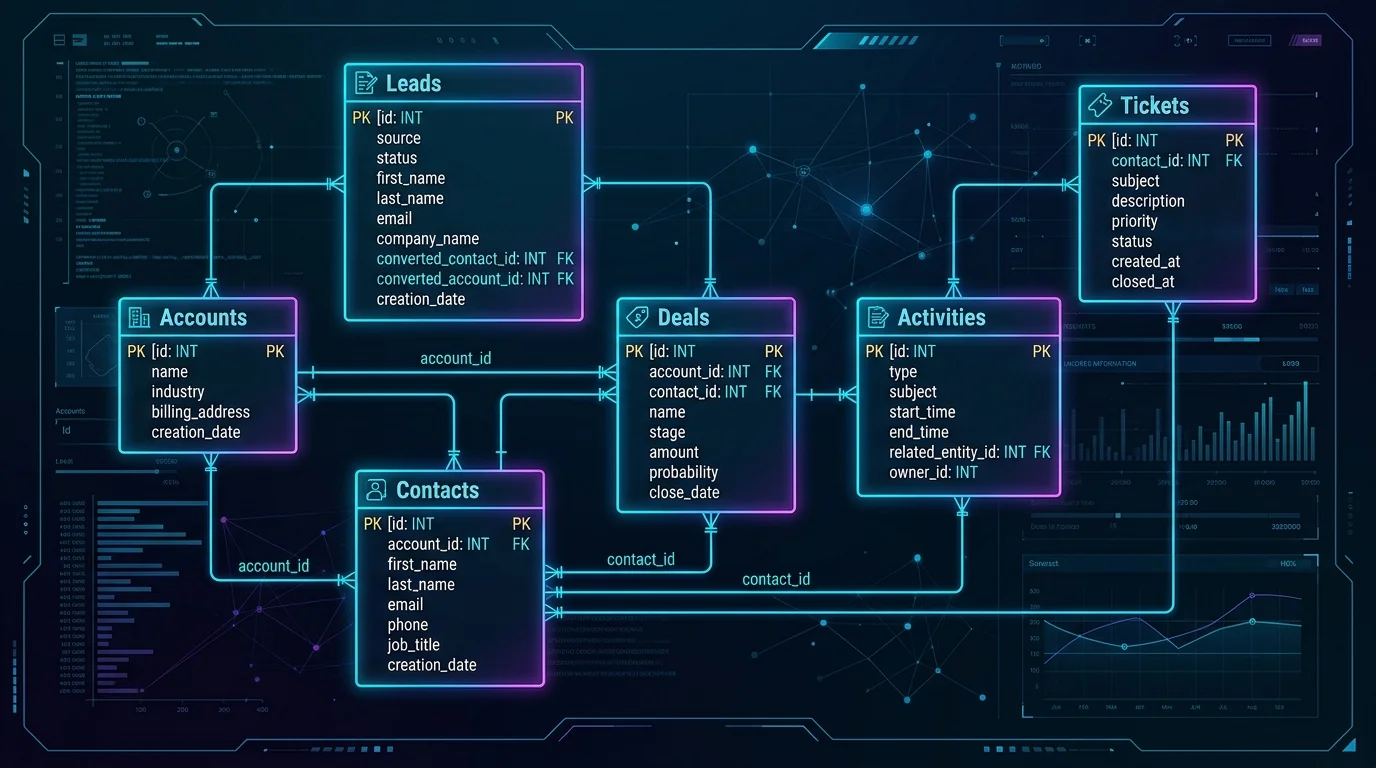
A resilient database architecture prevents performance degradation as contact records multiply. A standard custom CRM model requires 13 core relational entities:
- Users: Internal employees accessing the application with defined security roles.
- Accounts: Corporate organizations or client entities.
- Contacts: Individual persons associated with specific client accounts.
- Leads: Unqualified prospective buyers entering the pipeline.
- Opportunities: Qualified sales opportunities associated with accounts.
- Deals: Formal commercial transactions with monetary contract values.
- Activities: Logged historical interactions including calls, emails, and meetings.
- Tasks: Future operational assignments assigned to team members.
- Emails: Synced email correspondence linked to contacts.
- Calls: Call records with durations, outcomes, and audio recordings.
- Tickets: Customer service issues requiring operational resolution.
- Products: Catalogue of goods, services, and subscription plans sold.
- Orders: Invoiced transactions reflecting completed sales agreements.
Define relationships between CRM entities
Architect entity relationships using standard relational cardinality rules. A parent Account possesses a one-to-many relationship with child Contacts, a one-to-many relationship with Opportunities, and a one-to-many relationship with Activities. Link multiple contacts to multiple deals through dedicated junction tables to support complex buying committees.
Plan data validation and duplicate prevention
Enforce database constraints directly at the schema layer. Configure unique index constraints on normalized email addresses and corporate tax IDs. Execute fuzzy matching algorithms across incoming phone numbers and domain names to flag potential duplicates before committing records to the primary database.
Design for scalability
Maintain fast database response times under heavy concurrent loads through 5 structural practices:
- Create B-tree indexes across frequently queried foreign keys, status columns, and timestamp fields.
- Apply database normalization up to the Third Normal Form (3NF) to minimize data redundancy.
- Optimize query performance by avoiding expensive wild-card subqueries on unindexed text columns.
- Archive closed deals and resolved support tickets older than 36 months into cold storage tables.
- Implement automated nightly differential backups alongside continuous WAL (Write-Ahead Logging) replication.
Step 6: Choose the Technology Stack
Selecting the optimal technology stack depends on expected user counts, real-time data needs, security compliance standards, and internal engineering expertise.
Frontend
Modern CRM interfaces require responsive client-side rendering to facilitate fast table filtering and pipeline dragging. Select from 4 established frontend frameworks:
- React: Delivers a component-based ecosystem with extensive third-party UI libraries.
- Next.js: Combines server-side rendering (SSR) for fast initial load speeds with static generation.
- Vue.js: Provides lightweight reactive data binding and intuitive state management.
- Angular: Offers a structured, enterprise framework with native TypeScript support.
Backend
The backend layer handles business logic, security authentication, and API routing. Select from 5 reliable backend environments:
- Node.js (Express / NestJS): Executes asynchronous non-blocking event-driven I/O ideal for real-time chat and notifications.
- Python (Django / FastAPI): Enables rapid development with integrated administrative tooling and native machine learning libraries.
- PHP (Laravel): Provides mature database migration tools, authentication scaffolding, and extensive community packages.
- Java (Spring Boot): Delivers enterprise transaction management, strict typing, and multi-threading capabilities.
- .NET (C#): Integrates smoothly with Microsoft enterprise ecosystems and Active Directory infrastructure.
Database
Select database technologies based on record structure predictability:
- PostgreSQL: The industry standard for transactional CRMs, offering ACID compliance, relational integrity, and JSONB document support.
- MySQL: A reliable relational database providing high read performance and universal hosting compatibility.
- Microsoft SQL Server: Preferred for enterprise environments requiring tight integration with Microsoft reporting tools.
- MongoDB: Suitable for document-heavy modules, customer activity logs, and unstructured communication archives.
Cloud infrastructure
Host custom CRM systems across managed cloud platforms ensuring 99.9% uptime SLAs:
- Amazon Web Services (AWS): Deploy ECS/EKS container clusters, RDS PostgreSQL instances, and S3 document buckets.
- Microsoft Azure: Utilize Azure App Services, SQL Managed Instances, and native Entra ID single sign-on.
- Google Cloud Platform (GCP): Leverage Cloud Run for serverless container deployment and BigQuery for enterprise data analytics.
Step 7: Design the CRM User Interface and User Experience
Poor user interface (UI) and user experience (UX) design directly cause CRM project failures. Design clean screen layouts for 9 primary views: the main dashboard, global navigation menu, customer profile overview, lead qualification table, interactive sales pipeline, task management board, analytical report viewer, global search bar, and multi-variable filtering drawers.
Keep CRM workflows simple
Excessive data fields and cluttered navigation menus decrease daily system adoption. Restrict required input forms to essential details during live prospect calls. Implement progressive disclosure interfaces where advanced technical configurations remain hidden until specifically required by advanced users.
Design role-based dashboards
Configure tailored dashboard interfaces for 3 distinct employee roles:
- Sales manager dashboard: Displays cumulative monthly revenue, pipeline conversion percentages, team quota attainments, and sales velocity metrics.
- Sales representative dashboard: Prioritizes assigned open leads, today's scheduled calls, pending follow-up tasks, and active deal milestones.
- Customer support dashboard: Emphasizes open ticket volumes, average response times, SLA warning flags, and customer satisfaction scores.
Step 8: Build CRM Automations
To build a custom CRM management solution, engineering teams must configure automated event listeners that execute repetitive administrative actions without human input.
What CRM processes should be automated?
Automate 9 fundamental commercial procedures to eliminate operational bottlenecks:
- Assign incoming website leads based on geographical territory and sales rep capacity.
- Score prospect interactions based on page views, email link clicks, and content downloads.
- Generate follow-up reminder alerts when deals remain inactive for 5 consecutive business days.
- Dispatch instant email confirmations when demo requests are scheduled.
- Advance pipeline stages automatically upon verified digital signature capture.
- Create onboarding checklists for account managers immediately after closing a contract.
- Send welcome email sequences and user credential invitations to newly signed accounts.
- Escalate open support tickets to senior engineers when response times exceed 120 minutes (2 hours).
- Compile weekly revenue summary reports and transmit them to corporate leadership via Slack.
How custom CRM development improves sales automation processes
Custom CRM development improves sales automation processes by establishing direct trigger-to-action workflows that eliminate manual data transfer between disconnected platforms. Generic commercial software relies on delayed batch synchronizations and third-party middleware connectors. Custom CRM systems execute real-time event chains: Trigger → Validation Rule → Action → Notification → Database Update within 200 milliseconds (0.2 seconds). For example, when a prospective buyer submits a web inquiry, the CRM verifies company domain records, computes a lead score, assigns the account to the appropriate regional sales executive, schedules an introductory phone call task, transmits an alert to mobile devices, and updates the active deal pipeline automatically.
Step 9: Build Custom CRM Automations Using APIs and Webhooks
Modern CRM platforms coordinate data through Application Programming Interfaces (APIs) and webhooks to maintain real-time operational accuracy.
What is a CRM API?
A CRM API is a secure software intermediary that allows external computer programs to request data from, or submit data into, the CRM database using standardized protocols. RESTful APIs utilize standard HTTP request methods including GET to retrieve contact records, POST to create new leads, PUT/PATCH to update deal statuses, and DELETE to remove obsolete entries.
What are CRM webhooks?
CRM webhooks are automated, event-driven HTTP callbacks that transmit data payloads to external server destinations immediately after a specific event occurs. Webhooks push information automatically the instant a state change happens, avoiding continuous polling requests.
API vs webhook
Understand the functional distinctions between APIs and webhooks when architecting system integrations:
| Characteristic | CRM API | CRM Webhook |
|---|---|---|
| Communication model | Request-response (polling) | Event-driven (push notification) |
| Initiator | Client application requests data from CRM | CRM transmits data payload to external server |
| Data flow | Bi-directional (read, write, update, delete) | Unidirectional (event transmission) |
| Primary purpose | Retrieving, searching, and updating stored records | Broadcasting instant real-time status changes |
| Resource utilization | Requires periodic API queries and rate limit monitoring | Consumes resources only when an actual event occurs |
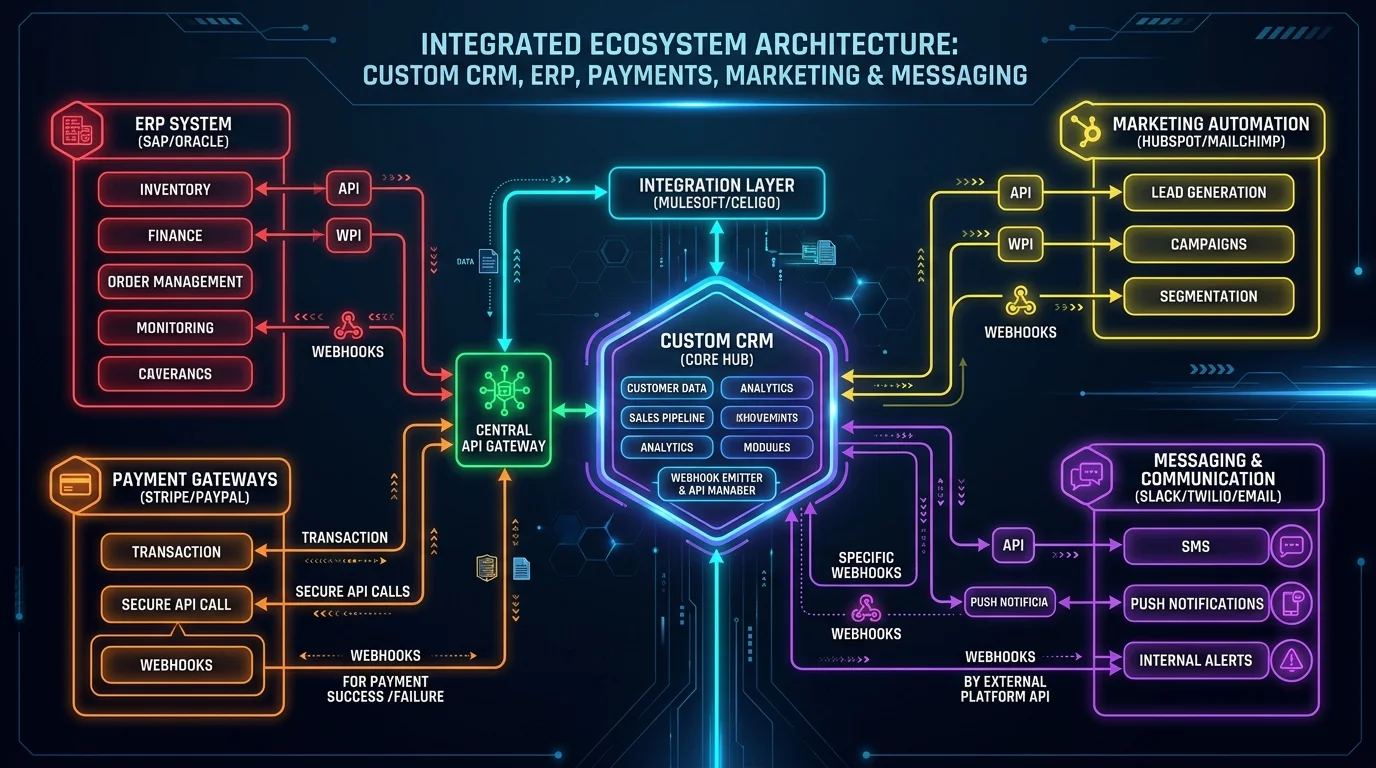
Examples of API-powered CRM automation
Utilize REST and GraphQL APIs for these 5 structural data exchanges:
- Website to CRM: Transmit inbound lead form submissions directly into the qualification pipeline via POST requests.
- CRM to accounting system: Generate draft invoices in QuickBooks or Xero when deal records transition to "Closed-Won".
- CRM to email platform: Sync segmented contact lists into Mailchimp or Klaviyo for targeted email marketing.
- CRM to payment platform: Query Stripe API endpoints to verify active credit card authorization statuses.
- CRM to ERP: Retrieve live warehouse inventory quantities from SAP during enterprise sales quoting.
Examples of webhook automation
Deploy event webhooks for immediate reactive triggers across external tools:
- Payment completed: Stripe dispatches a `charge.successful` webhook → CRM marks invoice paid → creates customer onboarding checklist → alerts customer success manager.
- Contract signed: DocuSign emits a `document.completed` payload → CRM transitions deal stage → attaches finalized PDF to account profile.
- Calendar event scheduled: Calendly sends an `invitee.created` webhook → CRM logs call activity → creates contact record if absent.
Step 10: Integrate Your Custom CRM With Other Business Tools
Connect your custom CRM across 5 primary software categories to maintain single-source-of-truth data integrity.
Marketing integrations
Integrate marketing tools to maintain lead attribution transparency. Connect email marketing services (e.g., Mailchimp, ActiveCampaign), website form endpoints, web analytics platforms (e.g., Google Analytics 4, Mixpanel), and advertising platforms (e.g., Google Ads, Meta Ads Manager) to attribute revenue directly to specific marketing campaigns.
Sales integrations
Integrate sales enablement tools to reduce manual rep activity. Connect business email providers (Google Workspace, Microsoft 365), calendar schedulers (Calendly, Google Calendar), VoIP telephony providers (Twilio, RingCentral), and external lead generation databases (LinkedIn Sales Navigator, ZoomInfo).
Finance integrations
Integrate financial applications to unify sales and billing ledgers. Synchronize accounting platforms (QuickBooks Online, Xero, FreshBooks), recurring subscription billing engines (Stripe Billing, Chargebee), and payment merchant gateways.
Operations integrations
Connect operational tools to streamline fulfillment after contract signing. Link enterprise ERP databases (NetSuite, SAP), real-time warehouse inventory software, and project management platforms (Jira, Asana, Monday.com).
Customer service integrations
Integrate support tools to give account managers visibility into active customer issues. Connect external help desks (Zendesk, Freshdesk), live website chat widgets (Intercom, Crisp), and centralized customer knowledge bases.
Step 11: Add AI to Your Custom CRM
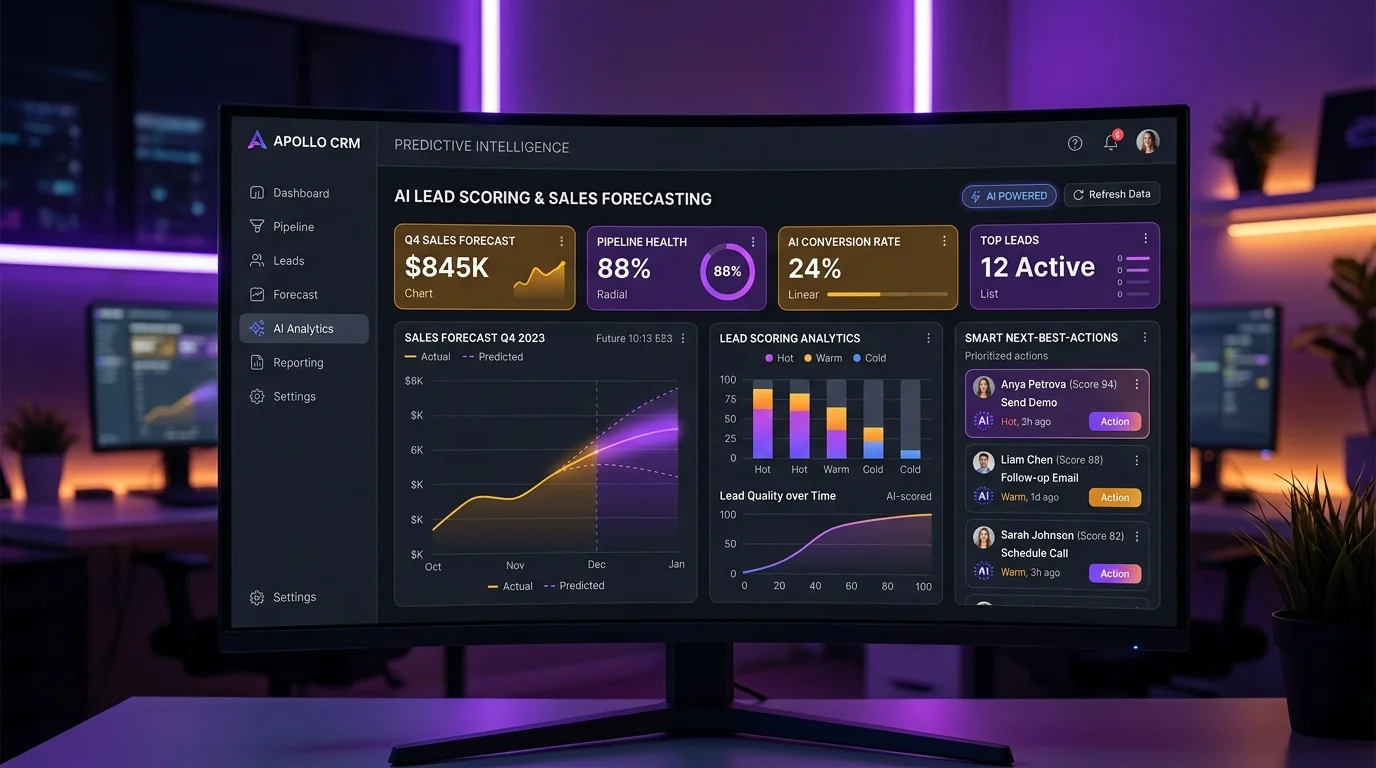
Integrating artificial intelligence into a custom CRM transforms passive record storage into an active sales acceleration engine. Deploy 10 practical AI capabilities:
- Predictive lead scoring: Analyze historical conversion indicators to rank inbound prospect close probabilities.
- Automated lead qualification: Process qualification questionnaires using natural language understanding.
- Email drafting: Generate customized prospect outreach drafts based on past correspondence.
- Call summarization: Transcribe sales call audio and extract key action items automatically.
- Customer sentiment analysis: Evaluate support ticket text to detect dissatisfied clients before churn events.
- Sales revenue forecasting: Project quarterly revenue using machine learning regression models.
- Next-best-action recommendations: Suggest optimal communication timing and channels for active opportunities.
- Automated customer responses: Resolve standard client status inquiries using retrieval-augmented generation (RAG).
- Data extraction: Parse unstructured contact cards and PDF purchase orders into structured database fields.
- CRM record enrichment: Fetch public company news and executive updates automatically to enrich account records.
Step 12: Implement CRM Security and Access Controls
CRM platforms store confidential customer records, financial agreements, and corporate strategies. Security architecture must be integrated into initial database models rather than applied after launch. Implement 10 fundamental security measures:
- Enforce multi-factor authentication (MFA) and Single Sign-On (SSO) using SAML 2.0 or OpenID Connect.
- Establish granular Role-Based Access Control (RBAC) restricting record editing to authorized roles.
- Implement Advanced Encryption Standard with 256-bit keys (AES-256) for data at rest.
- Enforce Transport Layer Security (TLS 1.3) across all network data transmissions.
- Secure API endpoints using OAuth 2.0 bearer tokens and strict rate-limiting policies.
- Maintain immutable, append-only audit logs recording every user view, export, and record modification.
- Execute automated daily encrypted database snapshots with off-site redundancy.
- Establish documented disaster recovery procedures guaranteeing Recovery Point Objectives (RPO) under 15 minutes.
- Conduct static code security analysis and dependency vulnerability testing prior to production releases.
- Ensure data storage complies with GDPR, California Consumer Privacy Act (CCPA), and SOC 2 Type II data residency standards.
Protect sensitive customer data
Design security architecture prior to writing software source code. Attempting to retrofit field-level encryption, multi-tenant isolation, or audit logging onto a deployed database requires expensive architectural refactoring and risks operational data corruption.
Step 13: Test Your Custom CRM
Execute quality assurance testing across 5 specialized testing layers before onboarding sales personnel.
Functional testing
Verify that every individual button, form validation rule, pipeline drag action, and calculation formula functions according to technical requirements. Test edge cases such as entering duplicate email formats or submitting empty fields.
Integration testing
Verify that external APIs and webhooks exchange data payloads correctly. Confirm that creating a customer in the CRM generates the corresponding account in QuickBooks and adds the recipient to SendGrid without field mapping errors.
Security testing
Attempt unauthorized data access by testing SQL injection, Cross-Site Scripting (XSS), and privilege escalation vulnerabilities. Confirm that a standard sales representative cannot view executive payroll records or export complete customer lists.
Performance testing
Execute load testing simulating 500 concurrent active users executing heavy database queries. Ensure server API response times remain under 200 milliseconds (0.2 seconds) during peak business hours.
User acceptance testing
Deploy the staging application to a pilot group of 5 sales representatives and 2 support agents. Verify that employees complete daily lead qualification and task management workflows without requiring administrative intervention.
Step 14: Launch the CRM With an MVP
Launch your custom CRM using a focused Minimum Viable Product (MVP) to gather real employee usage feedback and mitigate deployment risks.
What should a CRM MVP include?
A functional CRM MVP contains 8 fundamental modules:
- Contact and account management database tables.
- Inbound lead capture and qualification forms.
- Visual sales pipeline board with custom stage definitions.
- Basic task management and calendar follow-up reminders.
- Authenticated user accounts with baseline administrative roles.
- Standard revenue and pipeline summary dashboards.
- Core integrations with corporate email and website contact forms.
- Essential automations for lead assignment and deal stage notifications.
What can wait until later?
Postpone non-essential features until secondary engineering iterations, including advanced AI predictive analytics, complex multi-touch attribution models, native mobile iOS/Android applications, tertiary third-party marketplace integrations, and automated telephony dialers.
Develop → launch → measure → improve
Execute an iterative deployment lifecycle. Engineer the core MVP, release the platform to the initial sales department, monitor daily usage metrics, collect user feedback, and iterate features in two-week agile development sprints.
Step 15: Train Users and Measure CRM Adoption
Software value depends on daily user adoption. Conduct structured department training sessions, provide searchable internal video documentation, and collect continuous feedback to address workflow friction points.
CRM KPIs to monitor
Track 8 quantitative KPIs to evaluate custom CRM operational return on investment:
- User adoption rate: Percentage of licensed employees logging in and updating records daily (target: >90%).
- Lead conversion rate: Percentage of inbound marketing leads converted into qualified sales opportunities.
- Sales cycle length: Average number of days required to advance a prospect from initial inquiry to closed contract.
- Follow-up completion rate: Percentage of scheduled follow-up tasks completed within assigned deadlines.
- Pipeline velocity: Speed at which deals progress through pipeline stages toward closed revenue.
- Customer retention rate: Percentage of existing clients renewing subscription contracts annually.
- Revenue per customer: Average lifetime value generated per closed business account.
- Automated task percentage: Proportion of total administrative data updates executed by background code.
How to Build a Custom CRM Management Solution That Scales
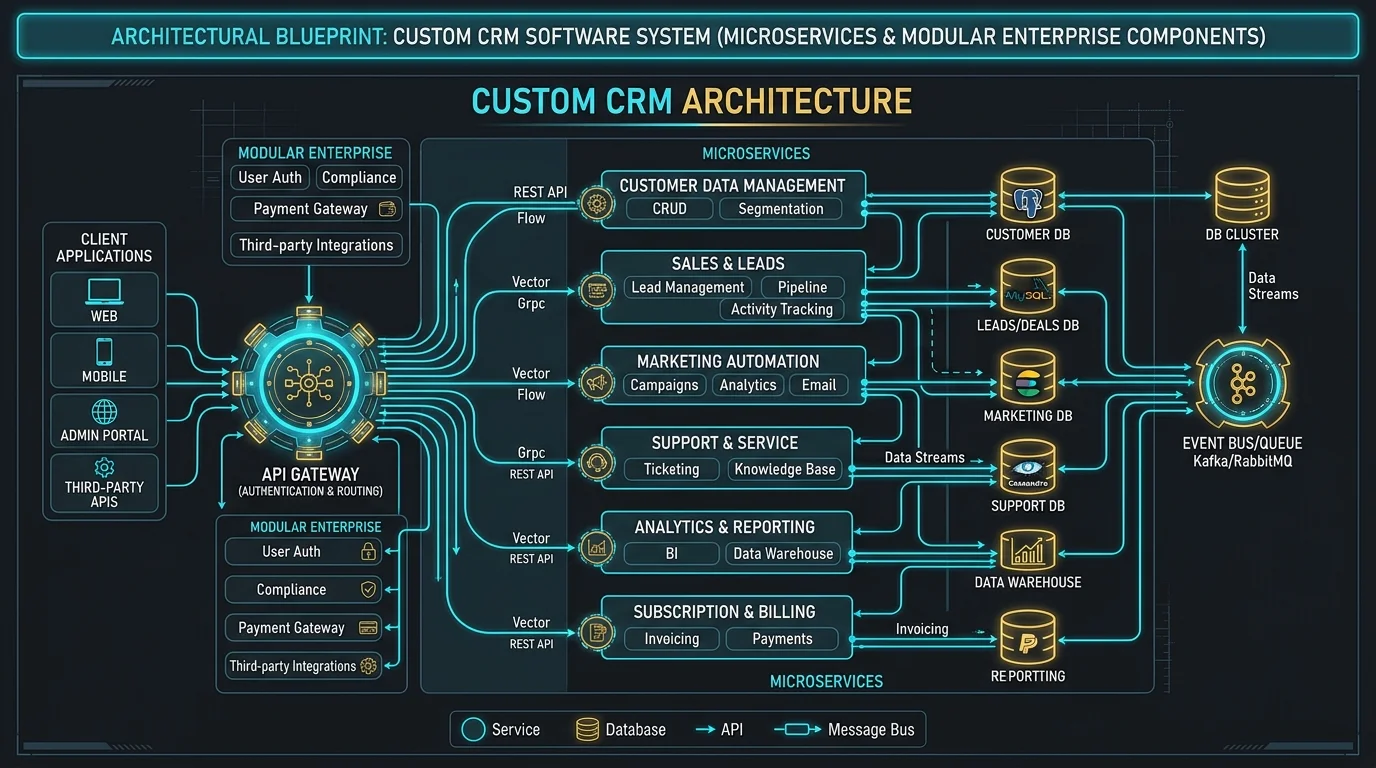
To build a custom CRM management solution that scales, implement a modular service-oriented architecture, an indexed relational database schema, and an API-first communication framework. Scalability must be planned during initial system architecture design. Deploy cloud microservices that scale computational resources independently as user traffic increases. Configure read-replica databases to offload intensive analytical reporting from the primary transactional database cluster. Maintain automated continuous integration and continuous deployment (CI/CD) pipelines to release system updates without causing application downtime.
How Much Does It Cost to Build a Custom CRM?
Building a custom CRM costs between $25,000 and $150,000+ depending on functional scope, third-party integrations, and user concurrency.
Factors that affect custom CRM development cost
Ten primary technical variables govern the overall engineering investment:
- Feature scope: Total number of dedicated modules, customized tables, and interface views.
- User capacity: Infrastructure sizing required to support 25 users versus 2,500 simultaneous users.
- UI/UX complexity: Standard component layouts versus fully customized interactive Kanban interfaces.
- Integrations: Number of external ERP, accounting, payment, and marketing platforms connected.
- Automation complexity: Simple notification triggers versus multi-branch algorithmic workflows.
- AI capabilities: Inclusion of machine learning predictive scoring, RAG agents, or automated transcriptions.
- Security compliance: Specialized engineering required for HIPAA, SOC 2 Type II, or PCI-DSS certification.
- Mobile accessibility: Responsive web application versus native iOS and Android mobile software.
- Engineering team: In-house developer salaries versus specialized CRM development agency partners.
- Ongoing maintenance: Server hosting infrastructure, software patches, and continuous technical support.
MVP vs mid-level vs enterprise CRM
Compare development scopes, timelines, and budgets across 3 implementation tiers:
| CRM Project Tier | Typical Feature Scope | Estimated Timeline | Estimated Investment |
|---|---|---|---|
| MVP Custom CRM | Core contacts, leads, visual pipeline, task reminders, email sync, basic reporting | 10 to 14 weeks | $25,000 – $50,000 |
| Mid-Level Custom CRM | Multi-pipeline tracking, advanced workflow automations, ERP/accounting integrations, role-based dashboards, custom analytics | 14 to 22 weeks | $50,000 – $120,000 |
| Enterprise Custom CRM | Multi-departmental modules, AI predictive lead scoring, multi-tenant security, native mobile applications, automated compliance audit logging | 24 to 36+ weeks | $120,000 – $250,000+ |
How Long Does It Take to Build a Custom CRM?
Building a custom CRM takes between 10 and 36 weeks depending on architectural scope and organizational complexity. A typical custom CRM development lifecycle progresses across 8 chronological phases:
- Phase 1: Requirements analysis and business process mapping: 2 to 3 weeks.
- Phase 2: UI/UX wireframing and interactive prototyping: 2 to 4 weeks.
- Phase 3: Database schema modeling and architecture design: 2 to 3 weeks.
- Phase 4: Core frontend and backend software development: 6 to 14 weeks.
- Phase 5: External tool integrations and API webhooks: 3 to 5 weeks.
- Phase 6: Quality assurance, security, and user acceptance testing: 2 to 4 weeks.
- Phase 7: Legacy data migration and validation: 1 to 2 weeks.
- Phase 8: Production deployment and employee training: 1 to 2 weeks.
Common Mistakes to Avoid When Building a Custom CRM
Avoid 11 documented engineering mistakes that derail custom CRM development initiatives:
Building too many features at once
Attempting to engineer every conceivable capability in version 1.0 causes timeline delays and budget overruns. Build a streamlined MVP to validate core sales workflows before adding secondary modules.
Not mapping business processes first
Writing software code prior to diagramming operational handoffs results in misaligned software that fails to support actual sales routines.
Ignoring user experience
Designing cluttered screens with excessive required fields leads to sales rep resistance. Keep data entry interfaces simple and intuitive.
Poor database planning
Failing to normalize database schemas or index foreign keys results in severe system slowdowns as contact databases exceed 100,000 records.
Underestimating integrations
Assuming third-party APIs function without edge-case errors leads to data sync failures. Budget adequate time for robust API error handling.
Automating a broken process
Applying automated code triggers to flawed manual workflows merely accelerates operational errors. Refine operational steps before writing automation scripts.
Ignoring data migration
Delaying legacy data cleansing until deployment week causes launch delays. Cleanse, de-duplicate, and map historical customer records early in development.
Weak security controls
Treating data security as an afterthought exposes customer records to unauthorized breaches. Implement role-based permissions and data encryption during initial architecture.
Not planning for scalability
Building single-server monolithic architectures without database read-replicas causes performance bottlenecks when team sizes double.
Building without user feedback
Isolating developers from daily sales reps results in features that fail to solve practical operational problems. Conduct weekly demos with frontline users.
Failing to establish measurable CRM KPIs
Deploying software without clear adoption metrics makes evaluating return on investment impossible. Define quantitative adoption and velocity targets prior to launch.
Custom CRM Best Practices
Apply these 12 established best practices when executing a custom CRM engineering initiative:
- Start with clearly documented business requirements before selecting technology stacks.
- Map end-to-end sales and customer lifecycles prior to development.
- Build a focused Minimum Viable Product (MVP) to validate core functionality.
- Keep the user interface clean with fewer than 7 required fields per stage.
- Automate repetitive administrative tasks to save sales rep time.
- Use standardized RESTful APIs for reliable external tool integrations.
- Use event-driven webhooks for real-time transactional synchronization.
- Design secure role-based access controls and field-level permissions.
- Build scalable cloud database architecture with proper indexing.
- Test all features rigorously with actual operational frontline users.
- Monitor quantitative adoption rates and pipeline velocity KPIs.
- Continuously improve system features based on user feedback.
Custom CRM vs Off-the-Shelf CRM: Which Should You Choose?
Selecting between custom CRM software and commercial off-the-shelf platforms requires evaluating structural operational trade-offs:
| Factor | Custom CRM | Off-the-Shelf CRM |
|---|---|---|
| Flexibility | Very high; engineered to exact business requirements | Limited to platform configuration menus and marketplace apps |
| Initial cost | Higher upfront development investment | Lower upfront setup fees |
| Recurring cost | Zero per-user software licensing fees; standard hosting costs | High monthly subscription fees that compound as headcount grows |
| Development time | Longer (10 to 28 weeks) | Faster (1 to 14 days) |
| Business-specific workflows | Excellent; mirrors exact internal processes | Variable; requires adjusting company processes to software |
| Integrations | Fully customizable via direct database and custom API connections | Depends on available third-party marketplace connectors |
| Scalability | Designed specifically around anticipated company data volumes | Platform-dependent; throttled by API rate limits and tier caps |
| Maintenance | Your company responsibility or development agency partner | Managed entirely by software vendor |
| Ownership | Complete ownership of intellectual property and database | Vendor owns platform code; data export constraints apply |
Strategic CRM Decision Framework
Choose off-the-shelf if: your sales processes follow standard linear pipelines, your team has fewer than 15 members, and you require immediate deployment within days.
Customize an existing CRM if: you need additional custom fields, dashboards, and basic third-party integrations, but do not require an independent software platform.
Build custom if: your CRM represents a strategic competitive advantage, your operational workflows cannot be supported by commercial tools, and you want to eliminate compounding monthly user seat fees.
FAQs About Building a Custom CRM
What is a custom CRM?
A custom CRM is a tailored customer relationship management software platform engineered specifically to match an organization's proprietary operational workflows, data schemas, and team roles. Unlike generic commercial platforms, a custom CRM provides complete ownership of source code and eliminates per-user monthly subscription fees.
What is CRM customization?
CRM customization is the technical modification of an existing CRM platform's native fields, database objects, visual interfaces, automated rules, and integration endpoints. Customization adapts commercial platforms such as Salesforce or HubSpot to satisfy specialized operational requirements without building a system from scratch.
What is customization in CRM?
Customization in CRM refers to code-level and schema-level adjustments made to expand platform functionality beyond native platform boundaries. Customization differs from basic administrative configuration by modifying data structures, writing custom automation scripts, and establishing custom API integrations.
How do you build a custom CRM?
To build a custom CRM, define operational objectives, map business processes, architect the relational data model, build backend APIs, design role-specific user interfaces, test core workflows, and release a minimum viable product. Developing in iterative agile sprints ensures frontline user adoption and reduces implementation risk.
How do you build a custom CRM system?
To build a custom CRM system, establish database entities, implement application programming interfaces, create user role permissions, configure bi-directional integrations, and deploy scalable cloud infrastructure. Structuring modular microservices ensures the application handles increasing data loads without performance degradation.
How do you make a custom CRM software?
To make a custom CRM software, select an appropriate frontend and backend framework, build database tables for accounts and opportunities, connect authentication layers, implement sales automation triggers, and conduct user acceptance testing. Utilizing frameworks like React, Node.js, and PostgreSQL provides a solid development foundation.
Do startups need a custom CRM solution?
No, early-stage startups with standard pipelines and small teams do not need a custom CRM solution. Startups should utilize off-the-shelf software until complex workflows, unique business models, or severe operational bottlenecks justify custom development.
Is a custom CRM better than an off-the-shelf CRM?
Yes, a custom CRM is better than an off-the-shelf CRM for companies requiring proprietary data schemas, zero recurring user seat fees, exact process alignment, and full data sovereignty. For organizations with standard sales processes and small headcounts, off-the-shelf solutions remain more cost-effective.
How much does it cost to build a custom CRM?
Building a custom CRM costs between $25,000 and $150,000+ depending on functional scope, third-party integrations, and user concurrency. A basic MVP costs $25,000 to $50,000, while complex enterprise systems exceed $120,000.
How long does it take to build a custom CRM?
Building a custom CRM takes between 10 and 36 weeks depending on architectural scope and organizational complexity. An initial MVP can be engineered and launched within 10 to 14 weeks.
Can a custom CRM integrate with other software?
Yes, a custom CRM integrates with external software through REST APIs, GraphQL endpoints, and event-driven webhooks. Custom systems connect directly to ERP databases, accounting ledgers, email platforms, and payment gateways.
Can APIs and webhooks automate CRM processes?
Yes, APIs and webhooks automate CRM processes by receiving transactional triggers in real time, synchronizing customer records, generating tasks, and notifying account owners without manual intervention. This eliminates manual data entry errors across disconnected platforms.
Can AI be integrated into a custom CRM?
Yes, AI can be integrated into a custom CRM by connecting large language model APIs and predictive machine learning models. AI automates lead scoring, call transcription summaries, customer sentiment detection, and sales revenue forecasting.
How does custom CRM development improve sales automation?
Custom CRM development improves sales automation by executing direct trigger-to-action logic that routes incoming leads instantly, updates deal stages upon verified events, and schedules follow-up tasks without manual human entry. Direct database triggers eliminate latency and third-party connector failures.
Final Thoughts: Is Building a Custom CRM Right for Your Business?
Deciding to build a custom CRM depends on a clear progression: Business requirements → Process mapping → Customization versus build decision → MVP architecture → Core development → System integrations → Automated workflows → Security testing → User launch → Continuous optimization.
Custom CRM engineering provides an effective path for businesses requiring complete control over their business process architecture, an optimized scalable relational database model, and unified bi-directional API and webhook automations. Deploying software aligned with tailored operational workflows eliminates recurring licensing overhead, accelerates sales cycles, and transforms customer data into predictable revenue growth.
Need a CRM Built Around Your Business Processes?
Consult with experienced system architects to evaluate your technical requirements, database architecture, third-party integrations, and development scope. We engineer custom CRM platforms built specifically to accelerate your revenue.