Table of Contents
Every year, organizations spend billions of dollars licensing Customer Relationship Management software under the assumption that a longer feature checklist translates into higher sales performance. Software procurement committees review exhaustive 200-row vendor spreadsheets, checking off enterprise forecasting modules, AI sentiment detectors, and multi-tier organizational charts.
Yet, six months post-implementation, the harsh reality sets in: sales account executives still live in Google Sheets, follow-ups slip through disconnected Outlook inboxes, deal stages sit untouched for weeks, and leadership has zero visibility into actual pipeline health.
Why does this happen? Because modern software marketing has conflated speculative vendor shelfware with operational CRM utility. In this guide, we strip away the marketing noise to establish the definitive must-have CRM features list. Grounded in peer-reviewed sales velocity research from the Harvard Business Review, enterprise data governance frameworks from Gartner, and real-world practitioner audits across thousands of active revenue teams, we explain which capabilities genuinely move the needle—and why lean, custom data architecture consistently outperforms bloated off-the-shelf software.
The Feature-Bloat Trap: Why 63% of CRM Features Go Unused
Enterprise software vendors possess a structural financial incentive to over-engineer their products. To justify charging $150 to $300 per user per month, SaaS platforms continually roll out esoteric add-ons, proprietary reporting layers, and complex form builders.
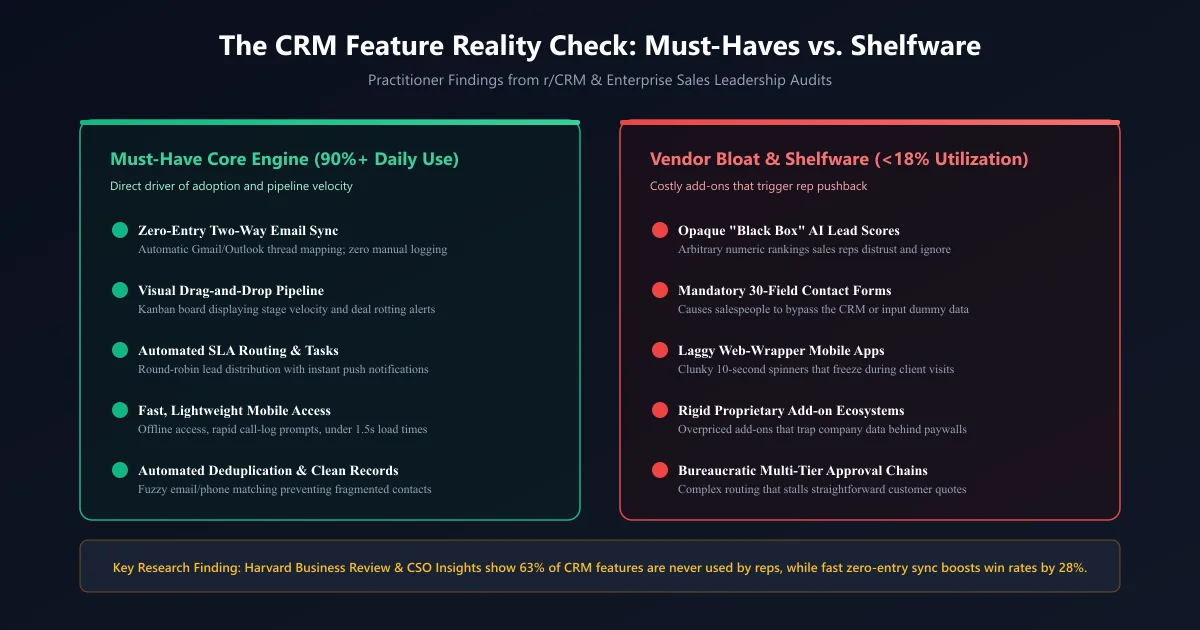
However, field research tells an entirely different story. Studies conducted by Harvard Business Review and sales benchmark audits from CSO Insights reveal that over 63% of purchased CRM features are never touched by daily sales reps. When a CRM forces account executives to fill out 25 mandatory form fields just to log an introductory phone call, reps do what human beings naturally do: they stage a quiet mutiny.
"The value of a CRM system is not defined by what it can theoretically calculate; it is defined by the volume and accuracy of clean data your team is willing to feed it every day without resistance."
When evaluating a CRM—whether configuring an out-of-the-box system or partnering with enterprise CRM development services for a custom CRM customization project—your checklist should prioritize features that remove friction rather than add administrative overhead.
The Reddit Reality Check: What Practitioners Actually Demand (r/CRM Analysis)
If you want the unfiltered truth about CRM software, look past vendor whitepapers and examine community discussions where actual business operators, sales engineers, and revenue leaders share their pain. On the popular Reddit discussion thread "What's the must-have CRM feature your business can't live without?", several clear operational patterns emerge:
"If my reps have to manually copy-paste an email or type out call notes after every meeting, they simply won't do it. Zero-click two-way email tracking isn't a perk; it's the only reason our CRM has any data at all."
Verified discussion thread consensusThe Reddit consensus cuts through corporate sales jargon with surgical precision. Practitioners repeatedly emphasize four operational truths:
- The "Zero-Entry" Mandate: Automatic, invisible two-way email and calendar sync is the single highest-leverage capability. If an interaction occurs in Outlook or Gmail and requires manual reproduction in the CRM, the system is doomed to fail.
- The "What Is Stuck?" Pipeline View: Teams do not need multi-dimensional matrix forecasts. They need a visual drag-and-drop Kanban pipeline that answers two basic questions at a single glance: "What deals are currently in progress, and which ones have stopped moving?"
- Sub-Second Mobile Response: Sales reps visiting clients in the field despise heavy enterprise mobile applications that freeze, crash, or require 10-second authentication handshakes. A lightweight mobile view with instant voice-to-text note taking is mandatory.
- Clean Master Data Without Duplicates: As businesses scale their inbound lead volume, duplicate records pollute the database. Reps end up pitching the same account simultaneously, destroying trust and embarrassing the brand.
The 8 Non-Negotiable CRM Capability Pillars
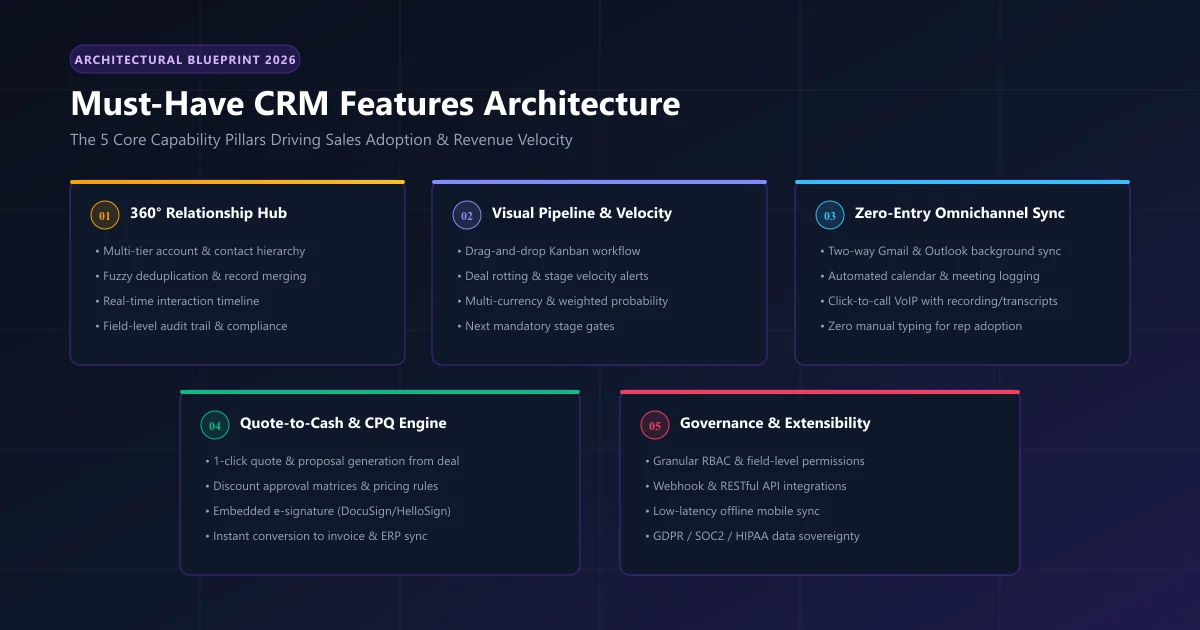
To construct an actionable evaluation model, we have synthesized enterprise adoption benchmarks, technical Master Data Management (MDM) specifications, and CSO Insights field studies into 8 core capability pillars. Any CRM software that lacks these 8 pillars cannot support a scalable commercial revenue engine.
1. 360-Degree Contact & Master Data Management
At its foundational level, a CRM must be an inviolable single source of truth for customer identities. According to enterprise data governance standards established by Gartner's Master Data Management (MDM) framework, centralizing relational master data across corporate parent-child hierarchies, authorized signers, and multi-channel communication logs is the non-negotiable prerequisite for preventing data drift and sales rep conflict.
Must-have contact management capabilities include:
- Hierarchical Account Mapping: The ability to link multiple individual contacts to a parent corporate entity, complete with distinct roles (Economic Buyer, Technical Evaluator, Legal Signer).
- Automated Fuzzy Deduplication: Real-time algorithms that detect duplicate submissions across email aliases, phone number hashes, and corporate domains before records are created.
- Unified Interaction Stream: A single, chronologically ordered feed displaying every email exchanged, call recorded, document sent, and meeting held with that contact.
- Custom Object Extensibility: As detailed in our guide on how to build a custom CRM, the architecture must support custom data fields and relational tables without breaking underlying database schemas.
2. Visual Drag-and-Drop Pipeline & Deal Velocity Management
Spreadsheets fail as sales tools because they lack visual state mechanics. A modern CRM requires an interactive Kanban-style pipeline that visualizes the exact journey of every commercial opportunity from initial qualification to closed-won.
Key pipeline management requirements:
- Customizable Stage Gating: Enforcing mandatory qualification criteria before a deal can be dragged from "Discovery" to "Proposal Sent" (preventing reps from prematurely inflating forecasts).
- Automated Deal Rotting Indicators: Visual alerts that highlight cards when an opportunity has stagnated in a specific stage beyond a pre-set threshold (e.g., 14 days without an interaction).
- Weighted Revenue Forecasting: Dynamic calculation of expected monthly and quarterly revenue based on stage probability percentages rather than optimistic rep guesswork.
- Multi-Pipeline Architecture: The flexibility to run concurrent, distinct pipelines for New Enterprise Sales, Inbound Mid-Market, Customer Renewals, and Professional Services.
3. "Zero-Entry" Omnichannel Communication Sync
This is the feature that separates high-adoption CRMs from abandoned software. In a modern sales environment, customer conversations occur across email, calendar invitations, VoIP phone calls, SMS, and WhatsApp.
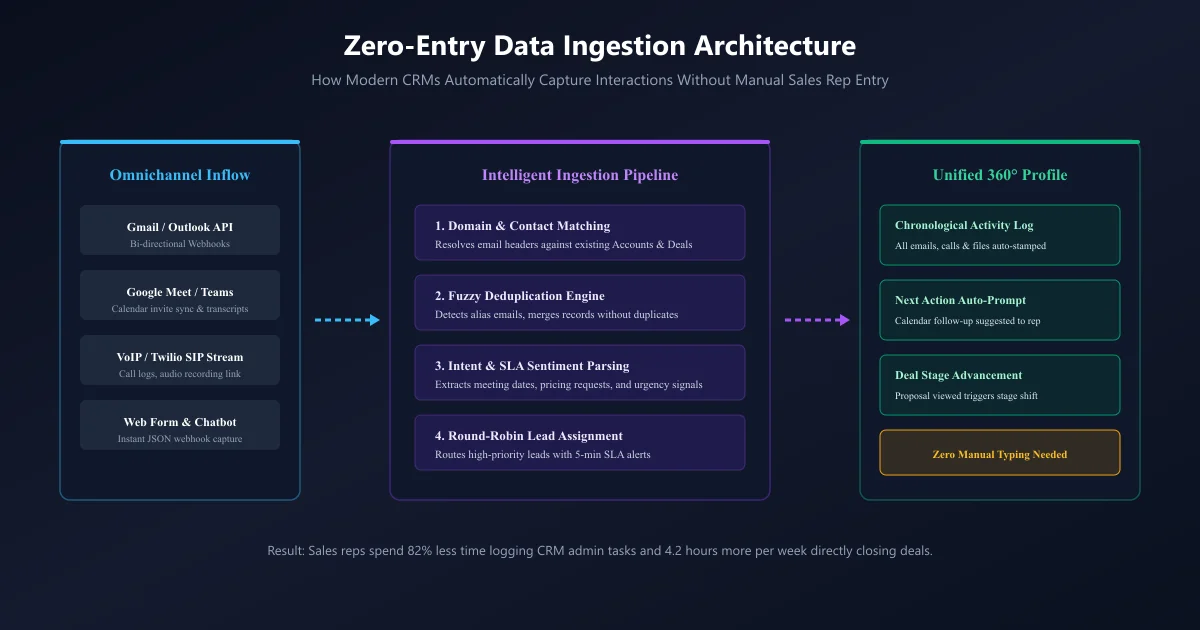
A true zero-entry communication layer requires:
- Bi-Directional Mailbox Sync: Native integration with Microsoft Graph API (Office 365) and Google Workspace API that auto-logs sent and received emails to the matching contact without requiring browser extensions or BCC forwarding addresses.
- Calendar Sync with Meeting Transcript Ingestion: Automatically matching scheduled Google Meet or Zoom invites to deals and archiving call recordings and AI summaries directly into the account timeline.
- Integrated Telephony (CTI & VoIP): Click-to-call dialing directly from the contact profile via Twilio or SIP endpoints, accompanied by automatic call logging and compliance recording.
- Two-Way SMS & Messaging: Centralizing customer text message exchanges within the CRM so communication history doesn't remain trapped on individual sales reps' personal smartphones.
4. Automated Workflow Triggers & SLA Lead Routing
Speed-to-lead is one of the most critical determinants of inbound sales conversion. Landmark research published in Harvard Business Review demonstrated that sales teams that contact online inbound leads within 5 minutes are nearly 21 times more likely to enter the sales cycle than those that wait 30 minutes.
Automated workflow capabilities must include:
- Intelligent Round-Robin Assignment: Programmatically distributing incoming web form leads, demo requests, and inbound chats across available account executives based on territory, deal size, or schedule availability.
- SLA Escalation Timers: If an assigned rep fails to open or contact a high-priority lead within 15 minutes, the CRM automatically reassigns the lead to an on-call manager or backup representative.
- Event-Driven Drip Sequences: Triggering personalized email nurture campaigns when a prospect interacts with specific marketing content or downloads a case study.
- Automated Internal Notifications: Instant webhook notifications dispatched to private Slack or Microsoft Teams channels when high-value deals enter final negotiation stages.
5. Integrated Quote-to-Cash (CPQ) & Document Management
One of the greatest operational bottlenecks in growing organizations is the friction between verbally closing a deal and generating a legally binding quote. According to research from the Forrester Sales Operations Index, companies that natively unify CRM opportunity records with estimation engines, automated discount approval matrices, and digital contract signing achieve a 34% faster deal cycle and eliminate up to 90% of contract billing discrepancies.
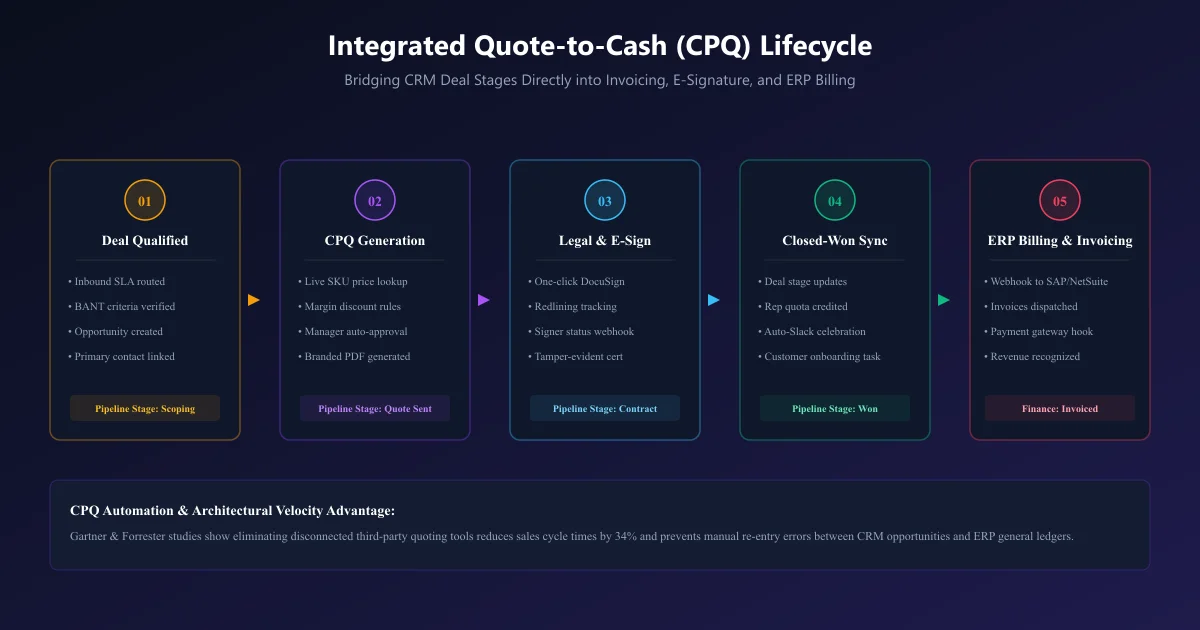
When CPQ lives directly inside the CRM, sales velocity accelerates:
- Native Product Catalog & Rate Cards: Reps assemble proposals by selecting standardized SKUs with built-in volume discounts and currency conversions.
- Dynamic Margin Guardrails: Automatic managerial sign-off workflows triggered whenever a sales rep attempts to apply a discount exceeding pre-authorized thresholds (e.g., >15%).
- One-Click Branded PDF Generation: Generating polished, professional proposals pre-populated with customer metadata, terms of service, and statement of work clauses in seconds.
- Embedded E-Signatures: Native integration with DocuSign or Adobe Sign that notifies the rep the exact second a client views, reviews, and signs the agreement.
- Automated ERP / Accounting Handoff: When a deal status shifts to "Closed Won," the CRM fires a webhook to accounting platforms like SAP ERP or QuickBooks, generating invoices and triggering fulfillment onboarding.
6. Real-Time Sales Analytics, Cohort Tracking & Forecasting
Leadership cannot guide a business through rearview mirror reporting. A must-have CRM reporting engine must provide forward-looking predictive visibility into revenue pipelines and individual rep efficiency.
Core analytics requirements:
- Pipeline Velocity Metrics: Measuring the four critical variables: number of qualified opportunities, average deal value, win rate percentage, and average sales cycle length in days.
- Stage Conversion Waterfall: Pinpointing exact drop-off points in your funnel (e.g., discovering that 45% of stalled deals occur between "Demo Completed" and "Proposal Sent").
- Cohort Retention & LTV Tracking: Tracking customer expansion, renewal dates, and churn metrics across customer cohorts over 12-, 24-, and 36-month horizons.
- Rep Activity vs. Outcome Correlation: Evaluating leading indicators (calls made, outbound personalized emails, meetings held) against closed revenue to optimize sales coaching.
7. Granular Role-Based Access Control (RBAC) & Compliance
Customer data is an organization's most sensitive corporate asset. A CRM that lacks granular security controls exposes the enterprise to catastrophic data theft, regulatory fines, and competitive espionage.
Critical governance capabilities:
- Field-Level Permissions: Restricting access so sales reps can view customer contact details but cannot view internal margin structures, executive notes, or credit card tokens.
- Territory & Team Data Partitioning: Ensuring regional teams (e.g., North America vs. EMEA) only access deals within their assigned operational territories.
- Comprehensive Audit Logging: Maintaining an immutable timestamped record of every user who viewed, exported, edited, or deleted a customer record.
- Regulatory Compliance: Built-in support for GDPR "Right to be Forgotten" record deletion, SOC 2 Type II audit readiness, and HIPAA compliance in healthcare environments.
8. Native Mobile Architecture with Offline Sync
Sales reps and field engineers do not operate exclusively behind dual-monitor office desks. When visiting client job sites, distribution centers, or conferences, internet connectivity can be intermittent or nonexistent.
Through our dedicated CRM mobile app development services, we find that mobile applications succeed only when they respect field conditions:
- Local SQLite / IndexedDB Offline Storage: Allowing reps to view customer records, check pricing catalogs, and log meeting notes without an active cellular connection, automatically syncing changes once connectivity resumes.
- Native Voice-to-Text Dictation: Letting reps dictate detailed meeting debriefs directly into the CRM while walking to their car immediately after a meeting.
- Geolocation & Proximity Mapping: Displaying nearby accounts and open prospects on an interactive map when a sales rep is traveling through a specific metropolitan area.
- Sub-1.5 Second Latency: Lightweight native code (React Native, Flutter, or Swift) rather than laggy web-view wrappers that frustrate users.
The Evaluation Matrix: Must-Have vs. Nice-to-Have Matrix
To assist procurement officers and CTOs during software audits, the table below provides an objective evaluation framework distinguishing non-negotiable operational requirements from discretionary features and vendor fluff.
| CRM Capability | Necessity Level | Impact on User Adoption | Implementation Risk | Recommended Priority |
|---|---|---|---|---|
| Zero-Entry Email/Calendar Sync | Non-Negotiable | Very High (+85% adoption) | Low (API Webhook) | P0 (Immediate Must-Have) |
| Visual Drag-and-Drop Pipeline | Non-Negotiable | High (Essential workflow) | Low (UI Layout) | P0 (Immediate Must-Have) |
| Fuzzy Deduplication Engine | Non-Negotiable | High (Preserves trust) | Medium (Data hygiene) | P0 (Immediate Must-Have) |
| Automated SLA Lead Routing | Non-Negotiable | Very High (Direct revenue) | Medium (Logic rules) | P0 (Immediate Must-Have) |
| Integrated CPQ & E-Signatures | High Priority | High (Cuts cycle by 30%) | Medium (Pricing logic) | P1 (Core Expansion) |
| Granular RBAC & Audit Logs | High Priority | Medium (Governance) | Low (Security schema) | P1 (Core Expansion) |
| Offline Mobile Application | High Priority | High (For field reps) | Medium (Sync architecture) | P1 (Core Expansion) |
| Complex Multi-Tier Approvals | Nice-to-Have | Negative (Slows deals) | High (Bureaucracy) | P2 (Evaluate Carefully) |
| Proprietary Black-Box AI Scoring | Shelfware / Fluff | Negative (Ignored by reps) | High (Costly tier upsell) | P3 (Deprioritize / Avoid) |
| Social Media Sentiment Feeds | Shelfware / Fluff | Negligible (<5% utility) | Medium (API rate limits) | P3 (Deprioritize / Avoid) |
The Architectural Crossroads: Off-the-Shelf SaaS vs. Custom-Tailored CRM
Once business leaders identify their true must-have features, they face a critical architectural decision: Should we license an enterprise SaaS platform like Salesforce or HubSpot, or should we engineer a tailored, custom CRM?
For small early-stage startups with standard sales motions, off-the-shelf SaaS platforms provide immediate out-of-the-box utility. However, as mid-market organizations scale past 25 to 50 sales professionals, the commercial SaaS model introduces severe economic and technical liabilities:
A 60-person enterprise paying $165 per user per month on an enterprise tier incurs over $118,800 in annual recurring licensing fees alone. Over a three-year window, that equals $356,400 spent on software subscription fees where over 60% of the bundled features remain completely untouched.
Beyond licensing costs, custom architecture delivers profound operational advantages:
- Zero Per-User Licensing Penalties: A bespoke CRM built on modern cloud architecture (Node.js/Python microservices, PostgreSQL, AWS/GCP serverless) incurs flat cloud infrastructure hosting costs (often under $300/month regardless of user headcount).
- Exact Workflow Alignment: Instead of forcing your sales team to adapt to rigid vendor conventions, custom software models your unique CPQ calculation matrices, industry compliance workflows, and proprietary lead scoring rules.
- Complete Database Sovereignty: You retain 100% ownership of your underlying PostgreSQL database, eliminating vendor lock-in, proprietary data export penalties, and sudden API price hikes.
- Effortless Deep Integrations: Direct, custom API webhooks link your CRM seamlessly with proprietary legacy databases, internal customer portals, and specialized ERP systems via our CRM integrations development services.
To explore the proven ROI framework and valuation multiples of database sovereignty, read our detailed analysis on why having a CRM is important to a business.
Practitioner Q&A: Solving Real-World CRM Pain Points from r/CRM
To provide immediate actionable value, we examined real user complaints from sales managers and founders on Reddit's r/CRM and synthesized engineering solutions for their most common dilemmas:
Query 1: "Our sales reps refuse to update deal notes and log activities. How do we fix this without micro-managing?"
Query 2: "Our enterprise CRM charges $150/user/mo, but our team only uses 4 basic features. Are there alternatives that don't sacrifice data security?"
Query 3: "Multiple SDRs keep emailing the same accounts because our database has duplicate records with slight name variations. How do we stop this?"
Query 4: "Are predictive AI lead scores worth upgrading to enterprise tiers for?"
Frequently Asked Questions (FAQ)
What are the absolute bare-minimum features needed in a small business CRM?
How long does it take to implement a modern CRM system?
How does CRM automation improve customer retention?
Can our existing CRM data be migrated to a new platform without downtime?
Ready to Architect a CRM Your Sales Team Will Actually Love?
Stop paying exorbitant SaaS seat fees for software your team avoids. Schedule a complimentary 30-minute architectural consultation with our senior CRM engineers to audit your existing workflows and design a lean, high-velocity CRM engine.

Written by Rehan Saeed
Founder & Principal CRM Architect at CRM Development Services
Rehan has led over 120+ custom enterprise CRM implementations and database migrations across healthcare, manufacturing, real estate, and financial technology. He specializes in eliminating software shelfware, designing high-throughput relational data schemas, and freeing enterprises from the SaaS seat tax.