What Is a CRM Pipeline? Architecture, Stages & Setup Guide
What is a CRM pipeline? At its technical core, a CRM pipeline is not merely a Kanban board with colorful cards—it is a deterministic finite-state machine and revenue accounting engine. It models every active deal through sequential, mutually exclusive operational stages (from lead intake to cash realization). By enforcing strict exit validation gates, tracking deal dwell time, and triggering event-driven webhook automations, a CRM pipeline replaces sales guesswork with mathematical revenue velocity, boosting forecast accuracy and sales cycle throughput across the entire enterprise.

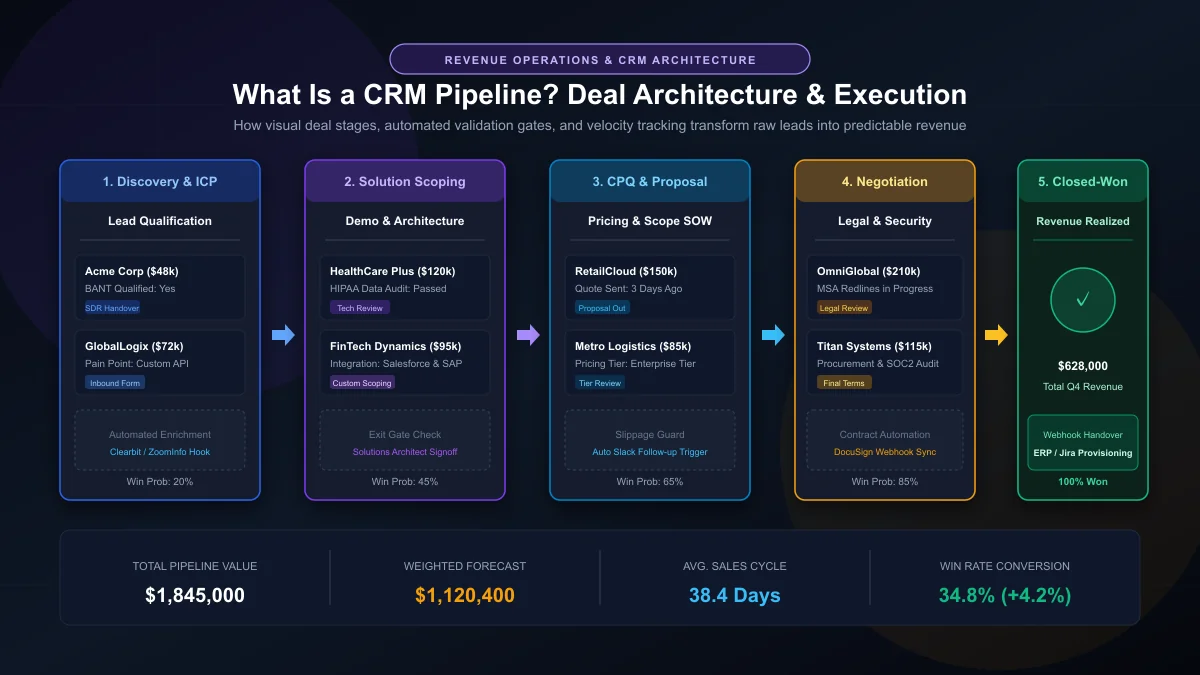
Table of Contents
In high-performing B2B enterprises, revenue generation is never left to intuition, charismatic pitches, or hope. It is treated as an engineering discipline. Yet when executive leadership audits their sales departments, an alarming discrepancy frequently surfaces: marketing channels deliver hundreds of inbound prospects, sales teams work 50-hour weeks, and yet end-of-quarter revenue targets miss board projections by 20% to 35%. Deals languish in indefinite limbo, follow-ups fall through administrative cracks, and executives cannot answer a fundamental operational question: where precisely are our qualified dollars getting stuck?
This operational failure almost invariably traces back to a broken, unmonitored, or misunderstood revenue framework. According to research published by the Harvard Business Review, enterprises that establish a formal, well-defined sales pipeline process generate up to 28% higher revenue growth and realize significantly greater win rates than those relying on informal deal tracking.
To eliminate forecast slippage, executive teams must answer one core question: what is a crm pipeline, and how does modern software architecture transform raw sales conversations into predictable, repeatable cash flow? At CRM Development Services, our engineers construct enterprise CRM solutions that treat deal tracking not as a static spreadsheet, but as an automated, event-driven state machine. In this architectural guide, we dissect the database models, stage-gate criteria, velocity metrics, and automation triggers required to build an unbeatable pipeline.
1. What Is a CRM Pipeline? Definition & Underlying Mechanics
At its most fundamental level, a CRM pipeline is a visual and data-driven representation of the sequential stages a sales prospect traverses as they transform from a qualified lead into a paying customer. It provides sales representatives, RevOps directors, and executive leadership with real-time operational visibility into the health, status, and financial value of every active opportunity across the organization.
However, when viewed through the lens of modern software engineering and revenue architecture, a CRM pipeline is far more than a visual Kanban board with draggable cards. It is an operational finite-state machine (FSM) governed by deterministic transition rules:
- Discrete State Entities: Every active transaction exists as an individual
DealorOpportunitydatabase entity, tied relationally to parentAccount(company) andContact(individual buyer) records. - Sequential Transition Paths: Deals advance through predetermined, non-arbitrary stages (e.g., Discovery → Solution Scoping → Proposal → Legal Review → Closed-Won).
- Mandatory Exit Gates: A deal cannot transition to the next state until specific, verifiable milestones and required fields are validated within the system.
- Event-Driven Triggers: Stage transitions automatically fire downstream webhooks—alerting solutions architects in Slack, generating CPQ quotes, or orchestrating automated follow-up sequences.
In a custom or enterprise CRM, a pipeline is not an isolated list. It serves as the relational bridge connecting your marketing automation, CPQ (Configure, Price, Quote) engines, contract lifecycle management (CLM), and ERP billing software. To learn how modern database schemas link these entities, explore our comprehensive guide on how to build a custom CRM.
Without a disciplined CRM pipeline, sales representatives manage opportunities according to subjective personal memory or disparate personal notebooks. Deals slip past quarter-end deadlines, pricing discounts are handed out without management oversight, and sales leadership remains unable to forecast future revenue with mathematical accuracy.
2. CRM Pipeline vs. Sales Funnel: The Vital Architectural Distinction
In sales discussions, the terms "sales pipeline" and "sales funnel" are frequently used interchangeably. Conflating these two concepts is one of the most destructive architectural mistakes a revenue team can make. While both concepts relate to customer acquisition, they serve completely different operational functions, track distinct metrics, and model contrasting perspectives of the commercial relationship.
A sales funnel models the customer's cognitive journey and overall conversion drop-off from a top-of-funnel perspective. It tracks macro population volumes as thousands of anonymous website visitors filter down into marketing leads, product trials, and eventual purchases. Funnels are inherently passive and aggregate-focused: they highlight percentage conversion leaks across marketing campaigns.
Conversely, a CRM pipeline models the sales team's concrete operational activities and deal milestones. It tracks individual, high-value opportunities through discrete seller actions—such as delivering tailored technical demonstrations, executing mutual NDAs, and delivering redlined master service agreements (MSAs). Pipelines are active and rep-centric: they dictate what specific tactical task must be executed today to advance a specific $100,000 contract toward close.
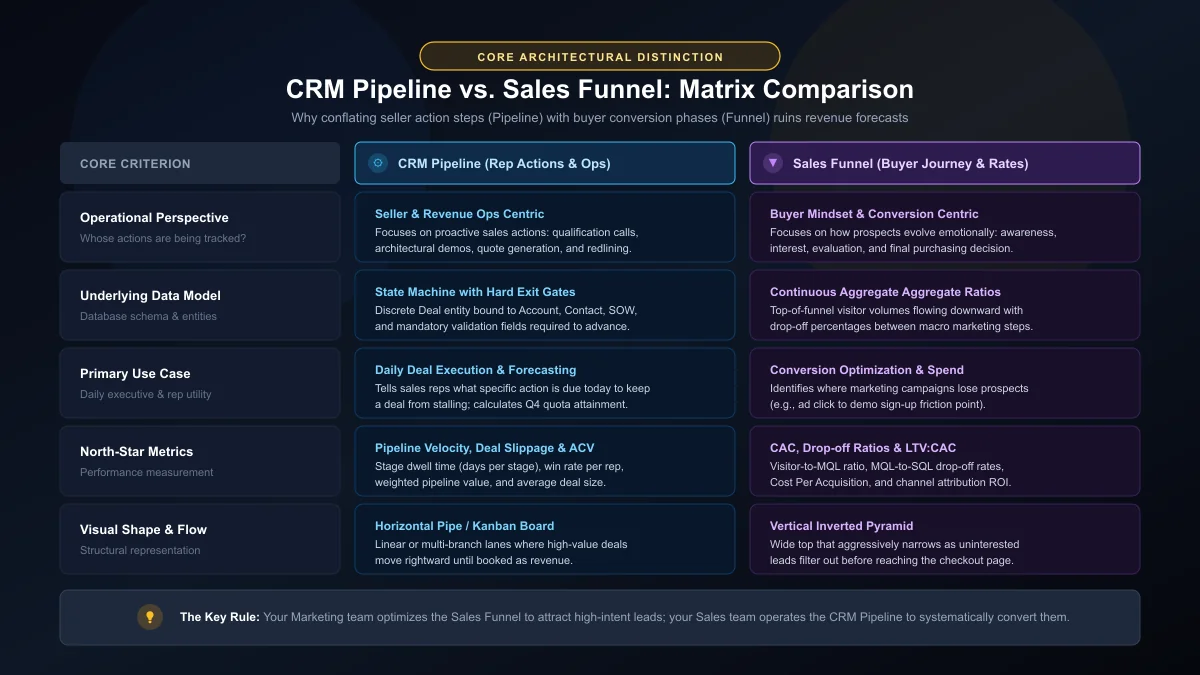
| Architectural Criterion | CRM Pipeline | Sales Funnel |
|---|---|---|
| Primary Focus | Seller Actions & Milestones: Tracking discrete reps' actions required to close qualified deals. | Buyer Mindset & Volume: Tracking prospective buyers' progression from awareness to intent. |
| Visual Geometry | Horizontal pipeline / multi-column Kanban state machine. | Vertical inverted pyramid reflecting continuous volume drop-off. |
| Data Unit | Individual, discrete Deal or Opportunity records with monetary values. |
Aggregated counts of users, visits, clicks, and marketing qualified leads (MQLs). |
| Operational Utility | Daily sales rep execution, deal stage validation, and quota forecasting. | Marketing attribution, ad spend optimization, and campaign friction analysis. |
| Core Metrics | Pipeline Velocity, Stage Dwell Time, Win Rate, and Average Contract Value (ACV). | Cost per Acquisition (CPA), Visitor-to-Lead Ratio, and Funnel Drop-off Rate. |
| Primary Stakeholders | Account Executives (AEs), Sales Directors, and RevOps Leaders. | Demand Generation Specialists, Growth Marketers, and CMOs. |
In short: Marketing optimizes the Sales Funnel to attract high-intent leads; Sales operates the CRM Pipeline to systematically convert them into booked revenue. For a broader look at core software capabilities, see our breakdown of the must-have CRM features list for enterprise deployments.
3. The 6 Core Stages of an Enterprise CRM Pipeline & Validation Gates
Every business possesses unique nuances, but high-velocity enterprise B2B sales pipelines adhere to a standardized six-stage framework. The fatal flaw in most off-the-shelf CRM configurations is that stage progression is subjective: sales reps move deals forward based on an optimistic hunch rather than verified buyer actions.
To build a predictable pipeline, every single stage must feature mandatory validation exit gates—hard criteria that must be satisfied and verified in the database before a deal can advance.
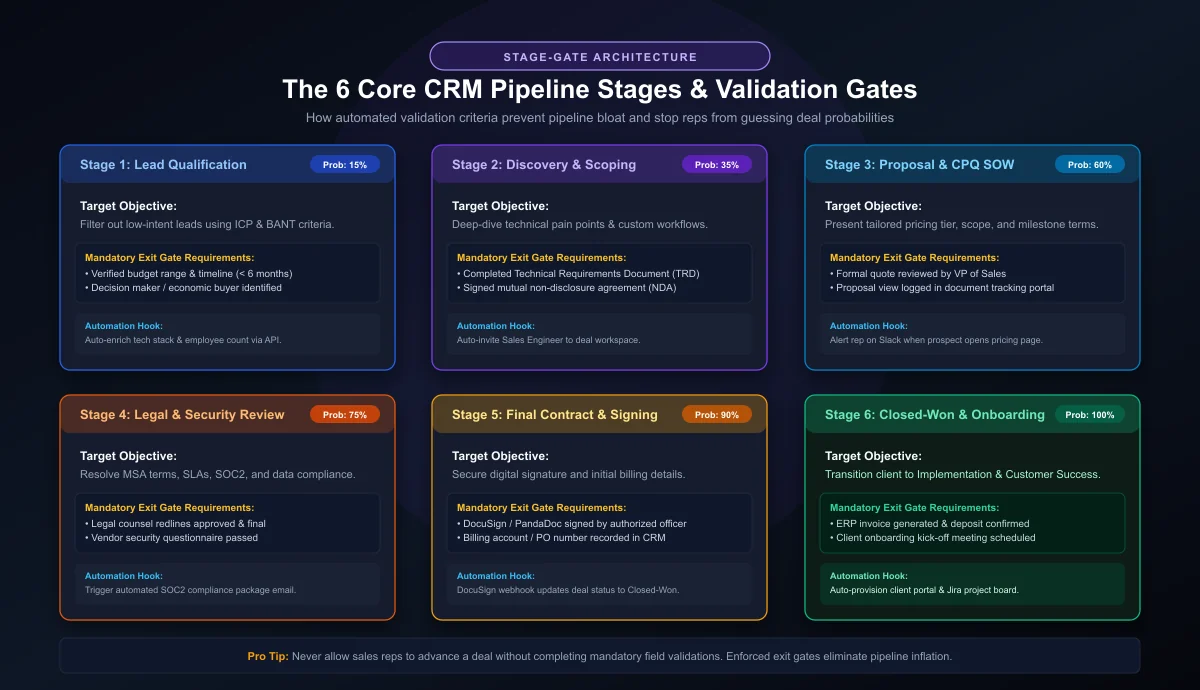
Stage 1: Lead Qualification & Discovery (Win Probability: 15%)
The moment an inbound inquiry or outbound SDR conversation converts into a qualified opportunity, it enters the pipeline. The objective of this initial stage is to verify whether the prospect aligns with your Ideal Customer Profile (ICP) using standardized qualifying frameworks such as BANT (Budget, Authority, Need, Timeline) or MEDDIC.
- Rep Actions: Conduct an initial 20-minute discovery call, identify core operational bottlenecks, and map the prospect's tech stack.
- Validation Exit Gates: Verified business budget range, confirmed decision timeline (e.g., < 6 months), and primary economic buyer identified.
- Automation Hook: Automated REST API webhook queries Clearbit or ZoomInfo to populate corporate revenue, employee headcount, and installed technology fields.
Stage 2: Needs Analysis & Solution Scoping (Win Probability: 35%)
In this stage, the sales team moves beyond high-level pain points to architect the exact solution required. For software and custom engineering engagements, this stage involves technical discovery, architecture mapping, and proof-of-concept (PoC) scoping.
- Rep Actions: Host a customized product demonstration or architectural consultation involving technical stakeholders and solutions architects.
- Validation Exit Gates: Completed Technical Requirements Document (TRD), confirmed list of required integrations (e.g., ERP, payment gateways), and signed mutual non-disclosure agreement (NDA).
- Automation Hook: The CRM assigns a Solutions Architect task in Jira or GitHub and sends calendar notifications for technical alignment calls.
Stage 3: Proposal & CPQ Quotation (Win Probability: 60%)
Once technical feasibility is validated, the team constructs a formal commercial proposal, Statement of Work (SOW), and pricing tier. At this phase, deals often encounter their first major friction point if pricing logic is managed manually in unlinked spreadsheets.
- Rep Actions: Deliver formal proposal presentation directly to executive decision-makers; outline concrete implementation milestones and expected ROI.
- Validation Exit Gates: Formal quote generated via integrated CPQ software, verified executive sponsor buy-in, and quote delivery confirmation.
- Automation Hook: Real-time webhook integration alerts the sales rep via Slack or Microsoft Teams the exact second the prospect opens or views the proposal document.
Stage 4: Legal, Security & Procurement Review (Win Probability: 75%)
In mid-market and enterprise deals, this stage represents the "valley of death" where deals frequently stall. Legal departments review Master Service Agreements (MSAs), IT security teams issue vendor security assessments (SOC 2, ISO 27001, HIPAA compliance), and procurement negotiates commercial terms.
- Rep Actions: Coordinate redlines between internal legal counsel and client legal teams; submit completed cybersecurity risk documentation.
- Validation Exit Gates: Final approval of MSA terms without outstanding legal redlines; formal passing of vendor cybersecurity screening.
- Automation Hook: The CRM automatically generates and shares a pre-compiled security packet and SOC 2 compliance verification package to the client's procurement contact.
Stage 5: Final Contract Negotiation & Verbal Acceptance (Win Probability: 90%)
All technical, legal, and operational hurdles are resolved. The client has provided verbal commitment, and the transaction is positioned for formal signature execution.
- Rep Actions: Dispatch execution-ready contracts via electronic signature platforms (DocuSign, Adobe Sign, or PandaDoc); confirm payment schedules and invoicing contacts.
- Validation Exit Gates: Outbound e-signature envelope delivered to the authorized signatory; purchase order (PO) number recorded.
- Automation Hook: If the document remains unsigned for 72 hours, the CRM automatically schedules a reminder task for the AE and alerts the VP of Sales.
Stage 6: Closed-Won & Client Onboarding Handover (Win Probability: 100%)
The contract is digitally executed, and initial deposits or subscription authorizations are confirmed. In an integrated CRM architecture, "Closed-Won" does not mark the end of the relationship; it triggers the operational transition to fulfillment.
- Rep Actions: Conduct a structured internal kickoff meeting with the Customer Success (CS) or Implementation Engineering team.
- Validation Exit Gates: Signed agreement archived in CRM repository, ERP invoice generated, and kick-off call confirmed on client calendar.
- Automation Hook: Bidirectional webhook automatically provisions the client organization in your application database, creates customer workspaces in Jira/Asana, and triggers the automated onboarding welcome sequence.
4. The Mathematics of Pipeline Velocity: How to Quantify Deal Flow
Most sales leaders monitor total pipeline value (e.g., "$5.2 million in open pipeline"). However, total pipeline value is a static vanity metric. A $5 million pipeline that takes eighteen months to close produces far less revenue than a $3 million pipeline that cycles every forty-five days.
To understand the true revenue generation power of your CRM pipeline, you must calculate Pipeline Velocity (V). Pipeline velocity measures the exact dollar value of booked revenue your sales engine generates every single day.
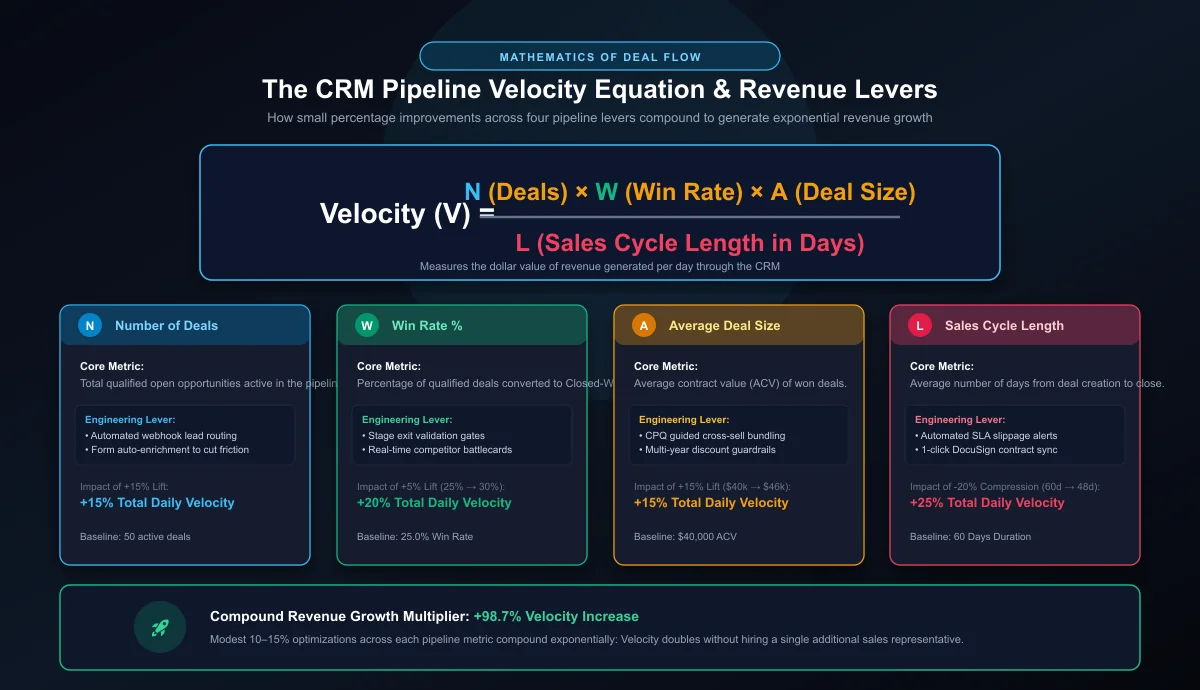
$$\text{Pipeline Velocity } (V) = \frac{N \times W \times A}{L}$$
- N (Number of Opportunities): The total volume of actively qualified deals currently in your pipeline.
- W (Win Rate Percentage): The proportion of qualified deals that reach Closed-Won status (e.g., 0.28 for 28%).
- A (Average Deal Size / ACV): The mean monetary value of a closed deal (e.g., $45,000).
- L (Sales Cycle Length): The average number of days required for a deal to travel from initial creation to Closed-Won.
Real-World Engineering Example: The Power of Compound Gains
Consider a mid-market B2B tech company with the following baseline sales pipeline parameters:
- Opportunities (N): 60 qualified deals
- Win Rate (W): 25% (0.25)
- Average Deal Size (A): $40,000
- Sales Cycle Length (L): 60 days
Plugging these baseline numbers into the velocity equation:
Now observe what happens when the organization applies engineering and operational rigor through custom CRM customization. Instead of attempting an unrealistic 100% surge in lead volume, they implement targeted optimizations across all four levers:
- Automated lead enrichment increases qualified pipeline volume by 15% (from 60 to 69 deals).
- Enforcing stage exit validation gates improves the win rate from 25% to 30% (+5% absolute lift).
- Integrated CPQ cross-sell bundles increase average deal size by 15% (from $40,000 to $46,000).
- Automated contract workflows and e-signature integrations compress cycle length by 20% (from 60 days down to 48 days).
By achieving modest 15–20% enhancements across individual pipeline parameters, the enterprise increases its daily revenue velocity by 98.4%. Monthly revenue virtually doubles without hiring a single additional sales representative. This is the mathematical power of disciplined CRM pipeline engineering.
5. Enterprise Multi-Pipeline Architecture Patterns
One of the most frequent architectural failures in growing businesses is forcing all commercial transactions into a single, generic pipeline. A $2,500 self-serve software subscription does not require the same sales cycle, legal review, or validation milestones as a $250,000 multi-department enterprise deployment.
In our custom CRM development services, we architect multi-pipeline ecosystems tailored to distinct revenue engines:
1. The Velocity Inbound / Mid-Market Pipeline
Engineered for transactional B2B deals with sales cycles spanning 14 to 30 days. This pipeline features streamlined stages (Qualify → Demo → Quote → Close), automated Calendly meeting scheduling, and minimal administrative friction.
2. The Complex Enterprise Solutions Pipeline
Designed for high-ACV ($100k+) transactions with multi-month evaluation horizons and multiple decision-makers. Stages mandate formal Proof-of-Concept (PoC) approval gates, InfoSec security compliance reviews, and procurement alignment. Stage probability weighting is calculated through objective stakeholder engagement metrics rather than arbitrary rep estimates.
3. The Customer Expansion, Upsell & Renewal Pipeline
Managing existing customer renewals and cross-sells inside the standard new-logo pipeline pollutes conversion analytics. A dedicated Account Management pipeline automates 90-60-30 day contract renewal workflows, surfaces software consumption anomalies, and flags churn risks before contract expiration. For related insights on customer lifecycles, review our evaluation on why having a CRM is important to a business.
4. Channel Partner & Reseller Pipeline
For companies scaling through partner distribution, this pipeline models co-selling dynamics, partner deal registration rules, margin splits, and joint customer demos.
6. Modern Automation, CPQ & AI Integration in CRM Pipelines
Manual pipeline administration is the single greatest driver of sales rep burnout and dirty CRM data. Research conducted by Salesforce's State of Sales Report reveals that sales representatives spend less than 30% of their working hours actually selling; the remaining 70% is consumed by manual data entry, quote drafting, and status updates.
Modern enterprise CRM platforms eliminate this administrative overhead through event-driven webhooks, native REST API integrations, and artificial intelligence:
Automated Stage Transitions via Webhooks
Instead of forcing reps to manually drag cards between stages, system state changes should occur automatically based on external real-world events. For instance:
- When an electronic signature is logged via DocuSign or PandaDoc, an integrated webhook instantly advances the deal state to Closed-Won.
- When an invoice is paid via Stripe or QuickBooks, the CRM updates the account status, logs revenue realization, and provisions user licenses via API.
- If you are integrating third-party tools into your sales stack, explore our guide on 5 essential APIs your CRM must integrate with.
AI-Driven Predictive Deal Scoring & Slippage Detection
According to insights from McKinsey & Company, organizations deploying AI-powered commercial architectures achieve a 10% to 20% increase in lead efficiency and significant pipeline acceleration.
Rather than relying on static percentages, machine learning models analyze dozens of deal telemetry variables—such as executive email sentiment, email response latency, proposal page dwell time, and historical win patterns—to compute dynamic, real-time win probabilities. If an enterprise deal sits in "Legal Review" for more than 14 days without client communication, the CRM automatically flags the opportunity as At Risk and triggers an escalation alert to the sales director. Discover more on how artificial intelligence is shaping customer software in our analysis of AI-driven CRM systems.
7. Six Costly CRM Pipeline Anti-Patterns (And How to Fix Them)
Even well-funded enterprises frequently sabotage their revenue potential by falling victim to common pipeline management mistakes. Auditing your CRM against these six anti-patterns is essential to maintaining forecast integrity:
Anti-Pattern 1: The "Zombie Pipeline" (Failure to Purge Stalled Deals)
Sales reps notoriously hate moving deals to "Closed-Lost," fearing it damages their personal performance metrics. As a result, deals that went cold four months ago remain parked in "Negotiation" or "Proposal Sent." This artificially inflates pipeline valuation and ruins executive forecast models.
The Architectural Fix: Implement automated Stage Dwell Time limits. If a deal exceeds 2.5 times your average stage duration without logged calendar events or client emails, an automated rule moves the deal to a "Cold Archive / Nurture" pipeline, removing it from active revenue forecasts.
Anti-Pattern 2: Absence of Objective Exit Validation Gates
Allowing reps to advance a deal simply because they had a "great conversation" creates a pipeline built on subjective optimism.
The Architectural Fix: Configure mandatory validation rules in your CRM. Require signed technical scoping documents, verified decision-maker names, and budget verification before the CRM database permits advancing to the Proposal stage.
Anti-Pattern 3: Inadequate Stage Granularity (The "Black Hole" Stage)
Having a pipeline stage named simply "In Progress" or "Working" where deals spend 80% of their lifecycle provides zero diagnostic value. If a deal stalls, leadership has no way of knowing whether it is blocked by security compliance, technical debt, or pricing disputes.
The Architectural Fix: Dissect ambiguous stages into specific operational milestones: separate Solution Scoping from Proposal Generation, and separate Procurement Review from Contract Execution.
Anti-Pattern 4: Disconnected CPQ & Contract Generation
When sales reps draft quotations inside offline Excel files and email PDF attachments manually, the CRM remains blind to deal scope revisions and discounting behavior.
The Architectural Fix: Implement native Configure, Price, Quote (CPQ) functionality directly within the CRM. This ensures line-item product pricing, automated discount approval workflows, and contractual terms are tethered directly to the underlying deal database record.
Anti-Pattern 5: Ignoring Loss Reasons and Post-Mortem Data
Closing a deal as "Lost" without capturing structured root-cause data guarantees that marketing and sales will repeat identical mistakes next quarter.
The Architectural Fix: Require mandatory, structured picklist fields upon Closed-Lost transitions: Competitor Selected, Budget Freeze, Product Feature Gap, Unresponsive, or Executive Departure. Feed this structured data into product roadmaps and competitive battlecards.
Anti-Pattern 6: Overcomplicating the Rep User Experience
If sales representatives must navigate through 45 mandatory text fields simply to log a discovery meeting, they will bypass the CRM entirely, resulting in data siloing and tracking failure.
The Architectural Fix: Utilize progressive profiling and dynamic stage layouts. Display only the specific fields relevant to the current stage, and leverage mobile CRM applications with voice-to-text logging to eliminate administrative drag.
8. Step-by-Step Blueprint: Designing High-Velocity CRM Pipelines
If your current CRM pipeline feels cluttered, unreliable, or neglected by your sales team, execute this five-step engineering overhaul:
Step 1: Map the Buyer's Verification Path
Do not design stages based on what your reps want to do; design them around what the buyer must verify to justify an enterprise purchase. Interview recent closed-won and closed-lost accounts to determine the exact internal approvals, security gates, and executive signoffs required to release budget.
Step 2: Formalize Hard Exit Gates & Stage Probabilities
For every stage in your pipeline, write explicit, binary exit criteria (e.g., "Must have email confirmation of security questionnaire receipt"). Review historical conversion data to assign accurate, data-backed win probabilities to each milestone rather than guessing round numbers.
Step 3: Integrate Your Inbound Tech Stack
Connect your pipeline directly to inbound lead sources using automated CRM integration services. Route form submissions, live chat inquiries, and product trial signups directly into Stage 1 with automated lead scoring and round-robin rep assignment within seconds of submission.
Step 4: Configure Real-Time Deal Alerts & Slippage Automations
Establish automated alerting bots in Slack or Microsoft Teams. Alert managers when high-value opportunities remain untouched for five business days, when deal close dates are pushed back multiple times, or when a proposal link is opened by a client executive.
Step 5: Conduct Weekly Pipeline Hygiene & Velocity Audits
Transform weekly sales meetings from subjective "deal story" sessions into objective pipeline audits. Review stage dwell times, identify velocity bottlenecks, and purge stale opportunities to keep your weighted forecasts mathematically sound.
9. Frequently Asked Questions About CRM Pipelines
Below are answers to the most common architectural and operational questions regarding CRM pipeline design and management:
What is a CRM pipeline and how does it actually work?
How does a sales pipeline differ from a sales funnel?
How is sales pipeline velocity calculated?
What are the standard stages of an enterprise B2B CRM pipeline?
Why do CRM pipelines suffer from deal slippage and inaccurate forecasts?
When should an enterprise build multiple CRM pipelines instead of one?
10. Strategic Summary & Next Steps
A CRM pipeline is far more than software UI—it is the central commercial operating system of your business. When properly designed, it translates high-level strategic revenue goals into daily, tactical execution steps for your sales force. By enforcing mandatory exit gates, continuously tracking pipeline velocity, and replacing manual data entry with automated webhook integrations, organizations transform their sales results from volatile guesswork into predictable, scalable revenue growth.
Whether you are modernizing an existing Salesforce, HubSpot, or Zoho deployment, or engineering a proprietary, custom CRM architecture tailored to your unique operational workflow, our team at CRM Development Services provides the architectural guidance, custom development, and systems integration required to maximize your pipeline throughput.
Ready to Engineer a High-Velocity CRM Pipeline?
Eliminate deal slippage, automate quoting and validation gates, and achieve predictable quarterly forecasts. Speak directly with our lead CRM architects to design an enterprise revenue engine tailored to your business model.
Rehan Saeed
Rehan Saeed is an enterprise CRM architect and revenue operations strategist. Over the past decade, he has architected custom CRM platforms, automated complex quote-to-cash pipelines, and integrated enterprise data systems for mid-market and Fortune 500 enterprises across healthcare, financial services, and B2B SaaS.